

Complete and detailed writeup of c4ptur3-th3-fl4g – a beginner level TryHackMe room.
CTF Writeups & Bug Bounty » Try Hack Me » THM Challenges » Solving c4ptur3-th3-fl4g – a beginner TryHackMe Room
Table of contents
Introduction
c4ptur3-th3-fl4g is a beginner TryHackMe CTF challenge that includes 4 tasks:
- Translation and Shifting (10 flags)
- Spectrograms (1 flag)
- Steganography (2 flags)
- Security through obscurity (2 flags)
We’re going to solve each task and retrieve the 15 flags!
Task 1 – Translation & Shifting
Question 1 – Leet words
- Question: c4n y0u c4p7u23 7h3 f149?
- Answer: can you capture the flag?
Well the first question is trivial, we simply need to interpret the sentence, our brain does it quite automatically.
Question 2 – binary
- Question: 01101100 01100101 01110100 01110011 00100000 01110100 01110010 01111001 00100000 01110011 01101111 01101101 01100101 00100000 01100010 01101001 01101110 01100001 01110010 01111001 00100000 01101111 01110101 01110100 00100001
This is a combination of bytes (8 bits). We can easily translate binary data to the corresponding ASCII letters
We’re going to use Python to decode it:
root@ip-10-80-180-122:~# python3
Python 3.8.10 (default, Sep 11 2024, 16:02:53)
[GCC 9.4.0] on linux
Type "help", "copyright", "credits" or "license" for more information.
>>> binarystring="01101100 01100101 01110100 01110011 00100000 01110100 01110010 01111001 00100000 01110011 01101111 01101101 01100101 00100000 01100010 01101001 01101110 01100001 01110010 01111001 00100000 01101111 01110101 01110100 00100001"
>>> print(''.join(chr(int(_,2))for _ in binarystring.split(' ')))
lets try some binary out!
- Answer: lets try some binary out!
Question 3 – base32
- Question: MJQXGZJTGIQGS4ZAON2XAZLSEBRW63LNN5XCA2LOEBBVIRRHOM======
This is base32 encoding, where each character represents 5 bits.
We can decode it easily using the base32 command in our terminal:
root@ip-10-80-180-122:~# echo -n 'MJQXGZJTGIQGS4ZAON2XAZLSEBRW63LNN5XCA2LOEBBVIRRHOM======' | base32 -d
base32 is super common in CTF's
- Answer: base32 is super common in CTF’s
Question 4 – base64
- Question: RWFjaCBCYXNlNjQgZGlnaXQgcmVwcmVzZW50cyBleGFjdGx5IDYgYml0cyBvZiBkYXRhLg==
Now, it’s base64 encoding – each character represents 6 bits.
We also have a native command to decode base64 in our terminal:
root@ip-10-80-180-122:~# echo -n 'RWFjaCBCYXNlNjQgZGlnaXQgcmVwcmVzZW50cyBleGFjdGx5IDYgYml0cyBvZiBkYXRhLg==' | base64 -d
Each Base64 digit represents exactly 6 bits of data.
- Answer: Each Base64 digit represents exactly 6 bits of data.
Question 5 – hexadecimal
- Question: 68 65 78 61 64 65 63 69 6d 61 6c 20 6f 72 20 62 61 73 65 31 36 3f
This is hexadecimal – ASCII codes are represented with base16, that goes from 0 to f (0 to 9 and a to f)
Let’s decode it using Python:
root@ip-10-80-180-122:~# python3
Python 3.8.10 (default, Sep 11 2024, 16:02:53)
[GCC 9.4.0] on linux
Type "help", "copyright", "credits" or "license" for more information.
>>> hexstring = '68 65 78 61 64 65 63 69 6d 61 6c 20 6f 72 20 62 61 73 65 31 36 3f'
>>> print(''.join(chr(int(_, 16)) for _ in hexstring.split(' ')))
hexadecimal or base16?
- Answer: hexadecimal or base16?
Question 6 – ROT13
- Question: Ebgngr zr 13 cynprf!
This sentence looks like ROT 13, and they gave us a hint with 13.
This is a substitution cypher where the key is always 13. So “a” becomes “n”, “b” becomes “o”, etc. Pretty easy to reverse, we can create a simple translation rule in Python:
root@ip-10-80-180-122:~# python3
Python 3.8.10 (default, Sep 11 2024, 16:02:53)
[GCC 9.4.0] on linux
Type "help", "copyright", "credits" or "license" for more information.
>>> rot13conversion = str.maketrans('ABCDEFGHIJKLMabcdefghijklmNOPQRSTUVWXYZnopqrstuvwxyz','NOPQRSTUVWXYZnopqrstuvwxyzABCDEFGHIJKLMabcdefghijklm')
>>> 'Ebgngr zr 13 cynprf!'.translate(rot13conversion)
'Rotate me 13 places!'
- Answer: Rotate me 13 places!
Question 7 – ROT47
- Question: *@F DA:? >6 C:89E C@F?5 323J C:89E C@F?5 Wcf E:>6DX
After ROT13, we have ROT47. ROT47 is like an extension to ROT13, where more than just the common Latin letters are encoded.
I just went on dcode to decode it.
- Answer: You spin me right round baby right round (47 times)
Question 8 – Morse code
- Question: – . .-.. . -.-. — — — ..- -. .. -.-. .- – .. — -. . -. -.-. — -.. .. -. –.
Of course this is the well known Morse code!
I decoded it on morsecode.world.
- Answer: telecommunication encoding
Question 9 – ASCII code
- Question: 85 110 112 97 99 107 32 116 104 105 115 32 66 67 68
This is simply the ASCII codes of characters.
Using Python:
root@ip-10-80-180-122:~# python3
Python 3.8.10 (default, Sep 11 2024, 16:02:53)
[GCC 9.4.0] on linux
Type "help", "copyright", "credits" or "license" for more information.
>>> values = '85 110 112 97 99 107 32 116 104 105 115 32 66 67 68'
>>> print(''.join(chr(int(_))for _ in values.split(' ')))
Unpack this BCD
- Answer: Unpack this BCD
Question 10 – Multiple encoding techniques
- Question: LS0tLS0gLi0tLS0gLi0tLS0gLS0t […] LS0tLS0gLi0tLS0
This one was a bit tricky and long.
It consists of:
- Base 64
- Morse
- Binary
- ROT47
- ASCII
We’ve seen all those cases above.
- Answer: Let’s make this a bit trickier…
Task 2 – Spectrograms
We are given an audio file (.wav), and the flag is in the spectrogram representation of its frequencies.
I used this website to visualize the spectrogram:
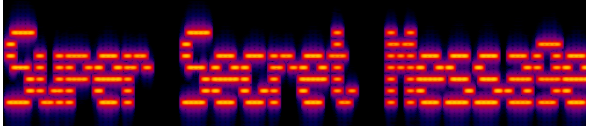
- Answer: Super Secret Message
Task 3 – Steganography
In this task we’re given a jpg image and we have to reveal a message hidden in it.
I use a cool website for a quick steganography checklist: https://www.aperisolve.com/
Uploading the image on this website, we find a flag in the steghide results
- Answer: SpaghettiSteg
Task 4 – Security through obscurity
In this task we’re also given a jpg image.
Question 1 – binwalk
- Question: Download and get ‘inside’ the file. What is the first filename & extension?
In the context of steganography, getting “inside” probably means that a whole file has been hidden inside the initial image.
In order to check if it’s true and extract the file, we use the binwalk tool.
I still used the previous website (https://www.aperisolve.com/) and downloaded the binwalk results. Opening the .7z file, there is an image inside named hackerchat.png.
- Answer: hackerchat.png
Question 2 – PCRT
- Question: Get inside the archive and inspect the file carefully. Find the hidden text.
Now we have to find the hidden text inside the hackerchat.png file.
Again, I used the aperisolve website: the hidden text appears in the Pcrt section (PNG Check & Repair Tool):
Correct PNG header
Correct IHDR CRC at offset 0x1D
IHDR chunk check complete at offset 0x8
Copied sBIT chunk (4 bytes)
IDAT chunk check complete at offset 0x8F
Correct IEND chunk
Found 22 bytes after IEND: b'"AHH_YOU_FOUND_ME!" '
IEND chunk check complete- Answer: AHH_YOU_FOUND_ME!
Conclusion – c4ptur3-th3-fl4g
c4ptur3-th3-fl4g is a very good CTF for beginners. Those encodings, especially base64 and ASCII-related encodings, are very common in CTFs and other aspects of cybersecurity/programming.
It was cool, and I hope you like the aperisolve website 😉
Disclaimer
This article is provided for educational purposes only.
All techniques demonstrated were performed in a controlled lab environment.
Do not attempt to reproduce these actions on systems you do not own or have explicit authorization to test.
I do not encourage or take responsibility for any illegal use of the information provided.