
Pentest Methodology » Pentest Tools » Web » Fuzz Websites with ffuf – Complete Tutorial
ffuf is one of the most useful tools for pentesting web apps during CTF or bug bounty.
ffuf means Fuzz Faster U Fool. It’s a web fuzzer made in Go, it’s fast, flexible and very easy to use.
In this tutorial we’re going to see all the possible uses through real use cases and examples.
Table of contents
Understanding ffuf
Basic ffuf Syntax
Let’s see a first example:
ffuf -u http://target/FUZZ -w wordlist.txt
Two options were used:
- -u: specifies the URL to target
- -w: specifies the wordlist that is being used
Notice the keyword FUZZ. It’s the core of ffuf:
- Each line of the wordlist will replace the keyword FUZZ
- One request will be sent per word
- The response is then analyzed and displayed by ffuf
For example, if the file wordlist.txt has those 3 lines:
admin
login
backup
Then from our example, ffuf will make the following HTTP requests:
http://target/admin
http://target/login
http://target/backup
That’s why it’s called a fuzzer: it allows us to “fuzz”, which means to send many different requests and potentially see differences in the server response.
Custom keywords and multiple wordlists
FUZZ is the default name for the keyword. But we can define our own keywords by adding “:” in front of the wordlist. For instance, if we want the keyword to be called BANANA, we’ll use the following syntax:
ffuf -w wordlist.txt:BANANA -u http://target/BANANA
Using this method, we can define multiple wordlists by naming them and using their keywords. For instance, if we want to fuzz both subdomains and a path:
ffuf -u http://SUB.target/PATH -w subdomains.txt:SUB -w endpoints.txt:PATH
Filtering ffuf results
We now know how to use ffuf to make requests with one or multiple wordlists. But we now need to filter the responses from the server.
See, for each request, ffuf by default will show the server responses that have a specific HTTP status code (200 to 299, 301, 302, 307, 401, 403, 405 and 500):
root@kali:/tmp# ffuf -w /usr/share/wordlists/seclists/Discovery/Web-Content/common.txt -u "https://google.com/FUZZ"

    	/'___\  /'___\       	/'___\
   	/\ \__/ /\ \__/  __  __  /\ \__/
   	\ \ ,__\\ \ ,__\/\ \/\ \ \ \ ,__\
    	\ \ \_/ \ \ \_/\ \ \_\ \ \ \ \_/
     	\ \_\   \ \_\  \ \____/  \ \_\
      	\/_/	\/_/   \/___/	\/_/

   	v2.1.0-dev
________________________________________________

 :: Method       	: GET
 :: URL          	: https://google.com/FUZZ
 :: Wordlist     	: FUZZ: /usr/share/wordlists/seclists/Discovery/Web-Content/common.txt
 :: Follow redirects : false
 :: Calibration  	: false
 :: Timeout      	: 10
 :: Threads      	: 40
 :: Matcher      	: Response status: 200-299,301,302,307,401,403,405,500
________________________________________________

.well-known/assetlinks.json [Status: 200, Size: 11625, Words: 977, Lines: 282, Duration: 14ms]
.well-known/security.txt [Status: 301, Size: 244, Words: 9, Lines: 7, Duration: 16ms]
2006                	[Status: 301, Size: 224, Words: 9, Lines: 7, Duration: 21ms]
2004                	[Status: 301, Size: 224, Words: 9, Lines: 7, Duration: 21ms]
[...]
It shows the status code (200 here), the size, how many words and lines are in the response, and the duration.
From the output, we know for instance that google.com/.well-known/assetlinks.json exists, returns a HTTP 200 status code and has 282 lines.
But we can customize the filter. Imagine we only want to keep the responses where the HTTP status code is 403. We can do that using the following command:
ffuf -u http://target/FUZZ -w wordlist.txt -mc 403
-mc stands for Match HTTP status code.
We can also decide to accept (match) all the responses, and only remove (filter) those that are 403, with the following command:
ffuf -u http://target/FUZZ -w wordlist.txt -mc all -fc 403
We match all the HTTP status codes, and then we filter out the 403. You’ll find more ways to filter or match responses below:
Useful ffuf options
HTTP Headers:
-H "Header-Name: value" # to set a custom HTTP Header
-H "User-Agent: FUZZ" # we can FUZZ HTTP Header(s) values
POST data:
-X FUZZ # we can FUZZ the HTTP methods
-X POST -d "username=admin&password=FUZZ" # to FUZZ password in POST data
-X POST -H "Content-Type: application/x-www-form-urlencoded" # to send POST data
Matchers (what results we want to see):
-mc 200 # only matches the HTTP 200 responses
-ms 1234 # only matches responses where the size is exactly 1234
-mw 49 # only matches responses that contain 49 words
-ml 12 # only matches responses that contain 12 lines
-mr "Welcome" # only shows the responses that match this regular expression
Filters (what results we want to remove):
-fc 404 # removes the HTTP 404 Not Found responses
-fs 1234 # removes the responses where the size is 1234
-fw 10 # removes the responses that contain 10 words
-fl 5 # removes the responses that contain 5 lines
-fr "hi" # removes the responses that contain the word "hi"
Other useful ffuf options:
-v: be more verbose
-ic: ignore comments in the wordlist
-s: silent mode (don't output the banner, the details of the options and the details of the responses)
-t: defines the amount of threads that ffuf will use
-rate: defines the rate of requests per second (important to respect Bug Bounty terms)
-r: follows redirect (can be very important!)
-b: defines cookie data (also very important)
Other options are available in the ffuf Manual page.
Conclusion on how to use ffuf
To sum up, ffuf does 2 things:
- Keyword substitution: keywords are replaced by wordlist entries. It applies to URLs, HTTP Headers, POST data (and PUT, DELETE, etc.), HTTP methods, authentication fields, cookies, tokens, etc. Anything inside a HTTP request can be FUZZed.
- Response filtering: we can filter the responses based on HTTP status code, response size, number of words or lines and regular expression patterns.
This gives us a very flexible tool, that can be used for instance to bruteforce a form or to discover virtual hosts.
It does basically everything that tools like dirbuster do, but it offers even more than these tools.
Let’s see real use cases.
Real Examples and Use Cases of ffuf
Below are the most common and practical ffuf use cases in CTFs or bug bounty, with options being used and real wordlists to be more realistic.
Directories, Files and Extensions Fuzzing
With ffuf, we can fuzz directories, file names and extensions of those filenames.
The following examples include fuzzing directories, fuzzing “index” extensions, and fuzzing javascript filenames:
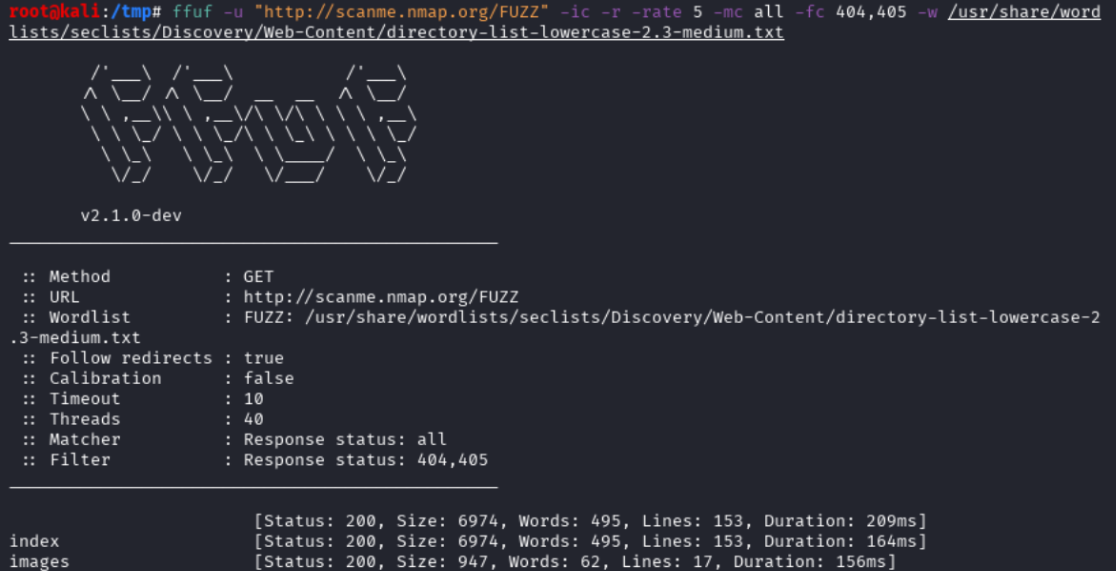
# FUZZ DIRECTORIES: silent mode, rate 5, follows redirect, filters 404/405, ignores comments
root@kali:/tmp# ffuf -u "http://scanme.nmap.org/FUZZ" -ic -r -rate 5 -mc all -fc 404,405 -s -w /usr/share/wordlists/seclists/Discovery/Web-Content/directory-list-lowercase-2.3-medium.txt

index
images

# FUZZ EXTENSIONS: silent mode, ignores comments, follows redirects, filters 404
root@kali:/tmp# ffuf -u "http://scanme.nmap.org/index.FUZZ" -ic -r -s -mc all -fc 404 -w /usr/share/wordlists/seclists/Fuzzing/file-extensions-lower-case.txt

html

# FUZZ FILE NAMES: same options as before
root@kali:/tmp# ffuf -u "http://scanme.nmap.org/shared/js/FUZZ.js" -ic -r -mc all -fc 404,405 -s -w /usr/share/wordlists/seclists/Discovery/Web-Content/directory-list-lowercase-2.3-medium.txt
Notice where the FUZZ keyword is located in the URL
HTTP Parameters Discovery
We can also fuzz parameters and see if the server response is different.
Examples with fuzzing the GET parameters and see if any response from the server has a size different from 6974 (default size when no parameters are used):
ffuf -u "http://scanme.nmap.org/?FUZZ=1" -ic -r -mc all -fs 6974 -s -w /usr/share/wordlists/seclists/Discovery/Web-Content/burp-parameter-names.txt
This kind of parameters discovery can also be done in other requests type (DELETE, PUT, etc. for API), and other data formats (JSON, etc.)
HTTP Headers Fuzzing
Either to fuzz the header names or their values:
ffuf -u "http://scanme.nmap.org/" -H "User-Agent: FUZZ" -ic -r -mc all -fs 6974 -s -w /usr/share/wordlists/seclists/Fuzzing/User-Agents/UserAgents.fuzz.txt

ffuf -u "http://scanme.nmap.org/" -H "FUZZ: 127.0.0.1" -ic -r -mc all -fs 6974 -s -w /usr/share/wordlists/seclists/Discovery/Web-Content/BurpSuite-ParamMiner/uppercase-headers
HTTP Method Fuzzing
Self explanatory:
ffuf -u "http://scanme.nmap.org/" -X FUZZ -ic -r -mc all -s -fc 405,501 -w /usr/share/wordlists/seclists/Fuzzing/http-request-methods.txt
HEAD
OPTIONS
GET
CONNECT
POST
Authentication Fuzzing
Either for brute-force in POST/GET data, or with Basic HTTP authentication in the URL scheme:
ffuf -u "https://target.com/login" -X POST -d "username=test&password=FUZZ" -ic -r -mc all -fr "wrong password" -w /usr/share/wordlists/seclists/Passwords/xato-net-10-million-passwords-100000.txt

ffuf -u "https://admin:FUZZ@target.com/" -t 10 -ic -w /usr/share/wordlists/seclists/Passwords/xato-net-10-million-passwords-100000.txt
ID/token Fuzzing
Examples:
- Fuzzing a OTP 6-digit code
- Fuzzing a post ID
- Fuzzing a basic user token in the cookies
ffuf -u "http://target.com/api/v1/otp" -b "userid=foo" -r -mc all -s -fr "wrong code" -w <(seq -w 0 999999)

ffuf -u "http://target.com/posts/FUZZ" -r -mc all -fc 404 -w <(seq 0 9999)

ffuf -u “http://target.com/user/profile” -b “userid=FUZZ” -mc all -fc 302 -w <(seq -w 0000 9999)
Virtual Host Fuzzing
Very useful during CTF (on Hack The Box for instance):
ffuf -u "https://target.com/" -H "Host: FUZZ.target.com" -fs 4529 -w /usr/share/wordlists/seclists/Discovery/DNS/subdomains-top1million-110000.txt
Final Thoughts on ffuf
As we saw, ffuf is a very flexible tool and is quite easy to use, with not a bunch of options.
The best thing when using ffuf is to:
- Use the correct wordlists
- Make sure that HTTP parameters are correct (tokens, cookies, follow redirect, HTTP headers for JSON or form data…)
- Respect the rate of requests per second
That’s it!
Disclaimer
All content published on this website is for educational purposes only.
The techniques, tools, and methodologies described here are intended to be used only on systems you own or have explicit permission to test.
I do not encourage or take responsibility for any illegal use of the information provided.