

CTF Writeups & Bug Bounty » Try Hack Me » THM Challenges » TryHackMe TakeOver Writeup – Subdomain Challenge
This post provides a full writeup of the TryHackMe “TakeOver” challenge. We enumerate subdomain and discover a private subdomain within a TLS certificate.
» Link to the room on TryHackMe
Table of Contents
Introduction – TakeOver
Here is the scenario for this challenge:
Recently blackhat hackers approached us saying they could takeover and are asking us for a big ransom. Please help us to find what they can takeover.

Our website is located at https://futurevera.thm

Hint: Don't forget to add the MACHINE_IP in /etc/hosts for futurevera.thm ; )
With all those hints, we are more than likely dealing with subdomain takeover.
It’s uncommon to come across subdomain takeover in CTFs, so let’s see how it goes!
Recon
Enumerating Virtual Hosts
First, let’s make a request with curl to the default web service that is probably running on our targets:
root@ip-10-82-135-87:~# curl 10.82.182.111 -isk
HTTP/1.1 302 Found
Date: Thu, 22 Jan 2026 11:02:32 GMT
Server: Apache/2.4.41 (Ubuntu)
Location: https://futurevera.thm/
Content-Length: 0
Content-Type: text/html; charset=UTF-8
curl options:
- -i: shows response headers
- -s: silent mode
- -k: allows insecure HTTP connections
We get a redirection: Location: https://futurevera.thm
Let’s add this domain name to our local hosts file:
echo -n '10.82.182.111 futurevera.thm' >> /etc/hosts
This allows the DNS resolution of futurevera.thm into 10.82.182.11 using the local /etc/hosts file.
Now, let’s use ffuf to find virtual hosts, both on HTTP and HTTPS:
ffuf -u "http://10.82.182.111/" -H "Host: FUZZ.futurevera.thm" -w /usr/share/wordlists/SecLists/Discovery/DNS/subdomains-top1million-110000.txt -mc all -fs 4605 -ic -r
[...]
portal                  [Status: 200, Size: 69, Words: 9, Lines: 2]
payroll                 [Status: 200, Size: 70, Words: 9, Lines: 2]

ffuf -u "https://10.82.182.111/" -H "Host: FUZZ.futurevera.thm" -w /usr/share/wordlists/SecLists/Discovery/DNS/subdomains-top1million-110000.txt -mc all -fs 4605 -ic -r
[...]
support                 [Status: 200, Size: 1522, Words: 367, Lines: 34]
blog                    [Status: 200, Size: 3838, Words: 1326, Lines: 81]
ffuf options:
- -u: target URL
- -H: custom HTTP header
- -w: wordlist
- -mc all -fs 4605: filters responses which sizes are equal to 4605
- -ic: ignores the comments in the wordlist
- -r: follows HTTP redirections
So we found 4 virtual hosts:
portal.futurevera.thmpayroll.futurevera.thmsupport.futurevera.thmblog.futurevera.thm
We also add these new subdomains into the /etc/hosts file:
echo -n ' portal.futurevera.thm payroll.futurevera.thm support.futurevera.thm blog.futurevera.thm' >> /etc/hosts
the -n option in echo prevents the automatic trailing new line
Let’s try and take over one of these subdomains.
Taking over a subdomain
Inspecting TLS certificate of support.futurevera.thm
Both payroll.futurevera.thm and portal.futurevera.thm return the following message:
<h1> payroll.futurevera.thm is only availiable via internal VPN </h1>
<h1> portal.futurevera.thm is only availiable via internal VPN </h1>
The blog subdomain is just a random blog.
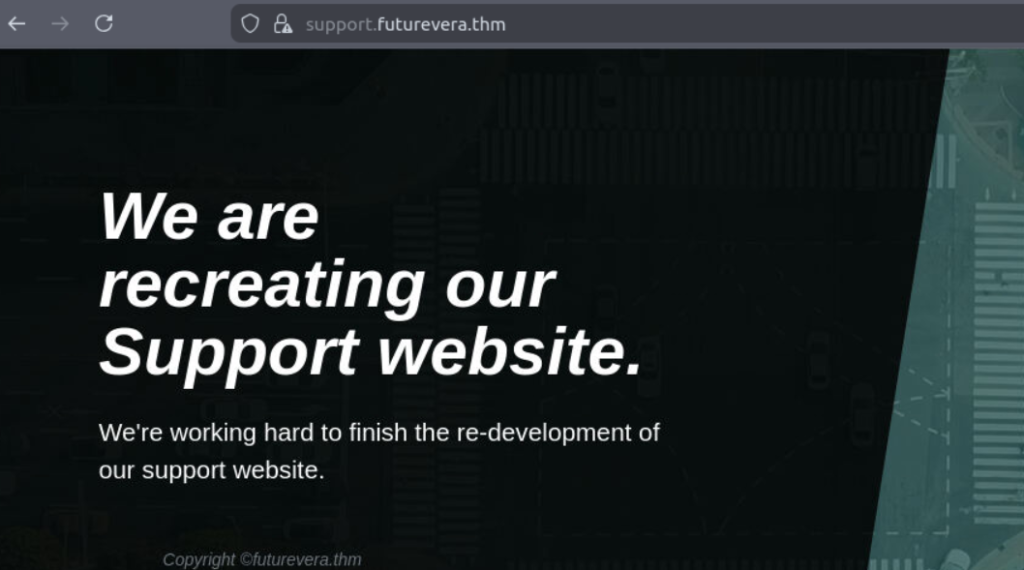
Only the support subdomain catches our eyes. Its banner states “We are recreating our Support website“:
Let’s use nmap to grab the TLS certificate as it’s a HTTPS website:
nmap -p 443 --script ssl-cert support.futurevera.thm
[...]
PORT    STATE SERVICE
443/tcp open  https
| ssl-cert: Subject: commonName=support.futurevera.thm/organizationName=Futurevera/stateOrProvinceName=Oregon/countryName=US
| Subject Alternative Name: DNS:secrethelpdesk934752.support.futurevera.thm
| Issuer: commonName=support.futurevera.thm/organizationName=Futurevera/stateOrProvinceName=Oregon/countryName=US
[...]
We use the script ssl-cert to grab the TLS certificate.
A strange value pops up:
Subject Alternative Name: DNS:secrethelpdesk934752.support.futurevera.thmThe Subject Alternative Name field allows a single TLS certificate to be used by multiple websites.
In this case, the certificate of support.futurevera.thm also applies to secrethelpdesk934752.support.futurevera.thm, thus exposing this domain name that was meant to be private.
Let’s add it to our hosts file:
echo -n ' secrethelpdesk934752.support.futurevera.thm' >> /etc/hosts
Getting the flag
After a simple HTTP request to the new subdomain, we find the flag in the Location header:
curl -skLi secrethelpdesk934752.support.futurevera.thm
HTTP/1.1 302 Found
Date: Thu, 22 Jan 2026 11:21:21 GMT
Server: Apache/2.4.41 (Ubuntu)
Location: http://flag{beea****************************}.s3-website-us-west-3.amazonaws.com/
Content-Length: 0
Content-Type: text/html; charset=UTF-8
That’s it for this CTF!
Final Thoughts – TakeOver
This CTF was very cool, it was specific to subdomains takeover and subdomains enumeration + certificate inspection.
Discovering subdomains through the SAN fields (Subject Alternative Name) is actually a real-life method used during Bug Bounty Reconnaissance for instead to find more subdomains.
Very good CTF, cut short by this quick flag once we found the SAN subdomain.
I hope you enjoyed this writeup!
You can read more THM Writeups on pentestguides.com:
- Solving Lookup – TryHackMe Challenge Writeup

- Solving Basic Pentesting – TryHackMe Challenge Writeup

- RootMe Writeup – Full TryHackMe CTF Solution

- Corridor Writeup – TryHackMe IDOR Challenge

- Lo-Fi Writeup on TryHackMe – File Inclusion

Disclaimer
This article is provided for educational purposes only.
All techniques demonstrated were performed in a controlled lab environment.
Do not attempt to reproduce these actions on systems you do not own or have explicit authorization to test.
I do not encourage or take responsibility for any illegal use of the information provided.