
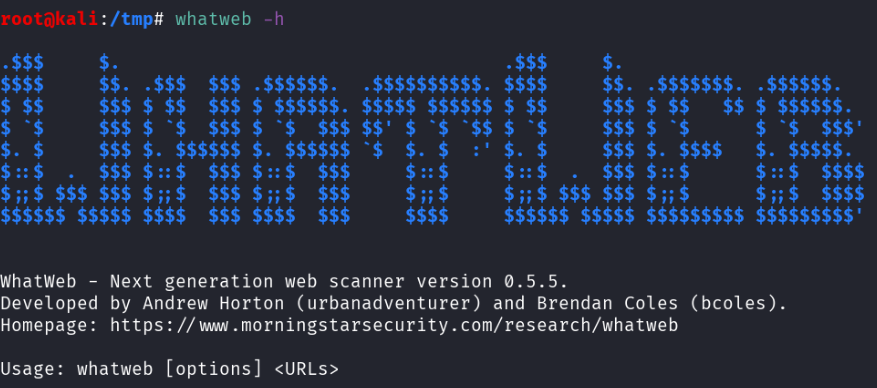
Pentest Methodology » Pentest Tools » Web » whatweb Tutorial: Identify Website Technologies
In this tutorial, we are going to see how whatweb can be used to identify the technologies and frameworks used by websites, in a single command line.
Table of Contents
What is whatweb
whatweb is a pentesting tool coded in ruby that detects the technologies and frameworks being used by websites.
Identifying technologies and frameworks used by our targets is an essential part of the Reconnaissance step during a penetration testing/bug bounty/CTF…
According to the official Kali Linux Tools page:
WhatWeb identifies websites. It recognises web technologies including content management systems (CMS), blogging platforms, statistic/analytics packages, JavaScript libraries, web servers, and embedded devices.

WhatWeb has over 900 plugins, each to recognise something different. It also identifies version numbers, email addresses, account IDs, web framework modules, SQL errors, and more.
WhatWeb works with plugins. These plugins are sets of rules that define for instance a URL to query or a regular expression to find inside the server response, ultimately leading to the discovery of a technology or a framework if successful.
whatweb can be installed with the following command:
sudo apt install whatweb
Let’s see it in action with real examples.
How to use whatweb to Identify Website Technologies
Simple Usecase
Let’s try with our website, pentestguides.com:
root@kali:/tmp# whatweb https://pentestguides.com/
https://pentestguides.com/ [200 OK] HTML5
HTTPServer[LiteSpeed]
IP[45.137.159.212]
LiteSpeed
MetaGenerator[All in One SEO (AIOSEO) 4.9.3,Site Kit by Google 1.171.0,WordPress 6.9]
Open-Graph-Protocol[article]
PHP[8.3.28]
Script[application/json,application/ld+json,module,speculationrules]
Title[PentestGuides – CTF, Pentest, Bug Bounty, Code, etc. - pentestguides.com]
UncommonHeaders[link,x-litespeed-cache,platform,panel,content-security-policy,alt-svc]
WordPress[6.9]
X-Powered-By[PHP/8.3.28]
X-UA-Compatible[IE=edge]
The command used was:
whatweb https://pentestguides.com/
Simply the command whatweb followed by the website we target: https://pentestguides.com/
Actually, I modified the output because by default, whatweb outputs everything on a single line:
root@kali:/tmp# whatweb https://pentestguides.com/
https://pentestguides.com/ [200 OK] HTML5, HTTPServer[LiteSpeed], IP[45.137.159.212], LiteSpeed, MetaGenerator[All in One SEO (AIOSEO) 4.9.3,Site Kit by Google 1.171.0,WordPress 6.9], Open-Graph-Protocol[article], PHP[8.3.28], Script[application/json,application/ld+json,module,speculationrules], Title[PentestGuides – CTF, Pentest, Bug Bounty, Code, etc. - pentestguides.com], UncommonHeaders[link,x-litespeed-cache,platform,panel,content-security-policy,alt-svc], WordPress[6.9], X-Powered-By[PHP/8.3.28], X-UA-Compatible[IE=edge]
So what did whatweb return?
- HTTP status code (200 OK) along with the HTML version (HTML 5)
- The HTTP Server being used (LiteSpeed)
- IP address of the domain name (45.137.159.212)
- WordPress Plugins used: All in One SEO and Site Kit by Google, with their exact versions
- Open Graph Protocol being used
- PHP version (8.3.28)
- WordPress version (6.9)
- Some HTTP headers and uncommon headers
- Some information about js on the page
That’s some good info to grasp the nature of a website.
Let’s see what options we can use on whatweb.
whatweb Syntax and Options
The syntax is straightforward:
whatweb [options] TARGET(s)
The TARGET(s) can be:
- URLs
- domain name(s)
- IP addresse(s) and IP ranges
whatweb doesn’t have a ton of options. Let’s see the main ones.
Read targets from a file (-i)
-i allows us to specify targets inside a file. For instance, with the file targets.txt containing the following lines:
https://pentestguides.com/
https://github.com/
Our command becomes:
whatweb -i targets.txt
whatweb launches the scan for all the targets found inside the file:
root@kali:/tmp# whatweb -i targets.txt
https://pentestguides.com/ [200 OK] HTML5, HTTPServer[LiteSpeed], IP[45.137.159.212], LiteSpeed, MetaGenerator[All in One SEO (AIOSEO) 4.9.3,Site Kit by Google 1.171.0,WordPress 6.9], Open-Graph-Protocol[article], PHP[8.3.28], Script[application/json,application/ld+json,module,speculationrules], Title[PentestGuides – CTF, Pentest, Bug Bounty, Code, etc. - pentestguides.com], UncommonHeaders[link,x-litespeed-cache,platform,panel,content-security-policy,alt-svc], WordPress[6.9], X-Powered-By[PHP/8.3.28], X-UA-Compatible[IE=edge]
https://github.com/ [200 OK] Content-Language[en-US], Cookies[_gh_sess,_octo,logged_in], Country[UNITED STATES][US], Email[you@domain.com], HTML5, HTTPServer[github.com], HttpOnly[_gh_sess,logged_in], IP[140.82.121.4], Open-Graph-Protocol[object][1401488693436528], OpenSearch[/opensearch.xml], Script[application/javascript,application/json], Strict-Transport-Security[max-age=31536000; includeSubdomains; preload], Title[GitHub · Change is constant. GitHub keeps you ahead. · GitHub], UncommonHeaders[x-content-type-options,referrer-policy,content-security-policy,x-github-request-id], X-Frame-Options[deny], X-XSS-Protection[0]
This is very useful when doing bug bounty on a large scale. We can provide whatweb with a file containing all the active subdomains we found, and quickly see what technologies are being used by all of them.
Aggression Levels (-a)
By default, whatweb only sends one HTTP request to our target, then parses the response from its plugin list to detect technologies.
But we can increase this “aggression” level with the -a option. It can be set to 1 (default), 3 or 4:
- 1: default aggression level, only one HTTP request is sent to each target
- 3: makes one HTTP request to the target. Then, for each technology detected (e.g. wordpress), it will make additional requests to gather more informatoin (e.g. plugins, versions, etc.)
- 4: attempts all plugin URLs. This is the “dumbest” aggression level, as it will have many failed attempts because regardless of the server response, it will go through each of the whatweb plugins. e.g. it will send requests to guess the WordPress version, even though it doesn’t detect that WordPress is being used. Great for an exhaustive scan but in real life targets it will create too much trafic for nothing.
Note that -a 2 doesn’t exist.
The difference between -a 1 and -a 3 is not that significative in terms of running time and requests sent, whereas if you lanch whatweb with -a 4 you are definitely going to wait much longer for not much additional information.
whatweb Logging Options
As you’ve seen, the logging is not very beautiful: the whole output is displayed in a single line, and it sucks.
Nonetheles, whatweb offers many logging options:
  --log-brief=FILE		Log brief, one-line output.
  --log-verbose=FILE		Log verbose output.
  --log-errors=FILE		Log errors.
  --log-xml=FILE		Log XML format.
  --log-json=FILE		Log JSON format.
  --log-sql=FILE		Log SQL INSERT statements.
  --log-sql-create=FILE		Create SQL database tables.
  --log-json-verbose=FILE	Log JSON Verbose format.
  --log-magictree=FILE		Log MagicTree XML format.
  --log-object=FILE		Log Ruby object inspection format.
  --log-mongo-database		Name of the MongoDB database.
  --log-mongo-collection	Name of the MongoDB collection.
				Default: whatweb.
  --log-mongo-host		MongoDB hostname or IP address.
				Default: 0.0.0.0.
  --log-mongo-username		MongoDB username. Default: nil.
  --log-mongo-password		MongoDB password. Default: nil.
  --log-elastic-index		Name of the index to store results. Default: whatweb
  --log-elastic-host		Host:port of the elastic http interface. Default: 127.0.0.1:9200
whatweb is able to output the results in JSON, XML, and database formats.
It can even connect to a MongoDB database and add the results in a collection (then it requires the host and credentials to connect to MongoDB).
For instance, the following command will output a JSON result inside pentestguides.json:
root@kali:/tmp# whatweb --log-json=pentestguides.json https://pentestguides.com/
Content of pentestguides.json:
[
  {
	"target": "https://pentestguides.com/",
	"http_status": 200,
	"request_config": {
  	"headers": {
    	"User-Agent": "WhatWeb/0.5.5"
  	}
	},
	"plugins": {
  	"HTML5": {},
  	"HTTPServer": {
    	"string": [
      	"LiteSpeed"
    	]
  	},
  	"IP": {
    	"string": [
      	"45.137.159.212"
    	]
  	},
  	"LiteSpeed": {},
  	"MetaGenerator": {
    	"string": [
      	"All in One SEO (AIOSEO) 4.9.3",
      	"Site Kit by Google 1.171.0",
      	"WordPress 6.9"
    	]
  	},
  	"Open-Graph-Protocol": {
    	"version": [
      	"article"
    	]
  	},
  	"PHP": {
    	"version": [
      	"8.3.28"
    	]
  	},
  	"Script": {
    	"string": [
      	"application/json",
      	"application/ld+json",
      	"module",
      	"speculationrules"
    	]
  	},
  	"Title": {
    	"string": [
      	"PentestGuides – CTF, Pentest, Bug Bounty, Code, etc. - pentestguides.com"
    	]
  	},
  	"UncommonHeaders": {
    	"string": [
      	"link,x-litespeed-cache,platform,panel,content-security-policy,alt-svc"
    	]
  	},
  	"WordPress": {
    	"version": [
      	"6.9"
    	]
  	},
  	"X-Powered-By": {
    	"string": [
      	"PHP/8.3.28"
    	]
  	},
  	"X-UA-Compatible": {
    	"string": [
      	"IE=edge"
    	]
  	}
	}
  }
]
Now we have the results in a standard format, that can be used by other tools or displayed in a better way (by styling the XML file for instance).
Other Useful whatweb Options
Other options might be useful:
--no-errors: doesn't output errors

--url-prefix=https://: adds "https://" at the beginning of all the targets

-l: list the plugins

--search-plugins=Wordpress: search for all the plugins that contain the word "Wordpress"

-p WordPress,Wordpress-Contact-Form: use only the specified plugins

-t 5: defines the number of threads (by default, whatweb uses 25 threads)

-v: verbose mode

-c "cookie=value": defines a cookie string

-U "foo": defines a custom User Agent (instead of the default WhatWeb UA)

-H "Header: Value": defines custom HTTP Headers

--wait 3: waits 3 seconds between each connection
The following whatweb examples will show how to use some of these options:
Miscellaneous whatweb Examples
1. Scan the local network, don’t log errors, use 30 threads, a custom User Agent, and output the results in a JSON file
Command used:
whatweb --log-json=LAN.json --no-errors -t 30 -U "Mozilla/5.0 (Linux; Android 8.1.0; X-TREME_PQ37) AppleWebKit/537.36 (KHTML, like Gecko) Chrome/83.0.4103.96 Mobile Safari/537.36" 192.168.1.0/24
Results inside LAN.json:
[
{"target":"http://192.168.1.145","http_status":200,"request_config":{"headers":{"User-Agent":"Mozilla/5.0 (Linux; Android 8.1.0; X-TREME_PQ37) AppleWebKit/537.36 (KHTML, like Gecko) Chrome/83.0.4103.96 Mobile Safari/537.36"}},"plugins":{"Country":{"string":["RESERVED"],"module":["ZZ"]},"HTML5":{},"HTTPServer":{"string":["SimpleHTTP/0.6 Python/3.13.2"]},"IP":{"string":["192.168.1.145"]},"Python":{"version":["3.13.2"]},"Title":{"string":["Directory listing for /"]}}}
]
2. Scan wordpress.org, with a custom UA, one thread, aggression level 3, logs in a XML format and only use the plugins called “WordPress” and “WordPress-Contact-Form”
Command used:
whatweb --log-xml=wp.xml -t 1 -a 3 -p WordPress,Wordpress-Contact-Form -U "Mozilla/5.0 (Linux; Android 8.1.0; X-TREME_PQ37) AppleWebKit/537.36 (KHTML, like Gecko) Chrome/83.0.4103.96 Mobile Safari/537.36" https://wordpress.org/
Results:
root@kali:/tmp# cat wp.xml
<log>
<target>
    	<uri>https://wordpress.org/</uri>
    	<http-status>200</http-status>
    	<request-config>
            	<header>
                    	<header-name>User-Agent</header-name>
                    	<header-value>Mozilla/5.0 (Linux; Android 8.1.0; X-TREME_PQ37) AppleWebKit/537.36 (KHTML, like Gecko) Chrome/83.0.4103.96 Mobile Safari/537.36</header-value>
            	</header>
    	</request-config>
    	<plugin>
            	<name>WordPress</name>
    	</plugin>
</target>
</log>
<log>
<target>
    	<uri>https://wordpress.org/</uri>
    	<http-status>200</http-status>
    	<request-config>
            	<header>
                    	<header-name>User-Agent</header-name>
                    	<header-value>Mozilla/5.0 (Linux; Android 8.1.0; X-TREME_PQ37) AppleWebKit/537.36 (KHTML, like Gecko) Chrome/83.0.4103.96 Mobile Safari/537.36</header-value>
            	</header>
    	</request-config>
    	<plugin>
            	<name>WordPress</name>
    	</plugin>
</target>
</log>
3. Search for all the plugins that contain the keyword “joomla” (an open source CMS)
Command used:
whatweb --search-plugins=joomla
Results (cropped):
root@kali:/tmp# whatweb --search-plugins=joomla
WhatWeb Detailed Plugin List
Searching for joomla
================================================================================
Plugin:     	FreeJoomlas_com
--------------------------------------------------------------------------------
Description:	FreeJoomlas.com - We provide free hosting for your Joomla
            	portals. It is absolutely FREE. Moreover, we provide FREE
            	subdomains (YOURNAME.FreeJoomlas.com) and UNLIMITED data
            	transfer.
Website:    	http://www.freejoomlas.com/

Authors:    	Brendan Coles <bcoles@gmail.com>
Version:    	0.1

Features:   	[Yes]  Pattern Matching (1)
            	[No]   Version detection from pattern matching
            	[No]   Function for passive matches
            	[No]   Function for aggressive matches
            	[No]   Google Dorks
[...]
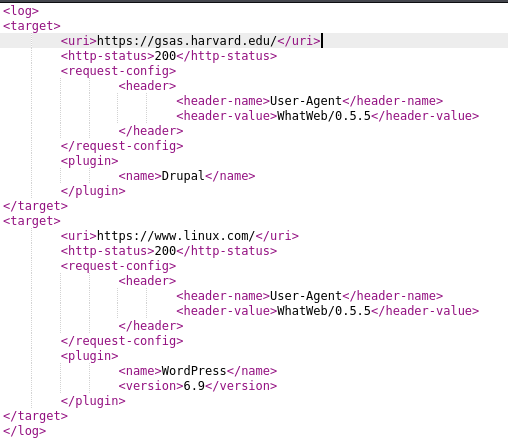
4. Scan gsas.harvard.edu and www.linux.com with the plugins Drupal, WordPress and Joomla (3 different CMS), using 20 threads and output the results inside a XML file
Command used:
whatweb --log-xml=whatweb.xml -p Drupal,Wordpress,Joomla -t 20 https://gsas.harvard.edu/ https://www.linux.com/
Results when viewing whatweb.xml:
Final Thoughts – whatweb
To end this tutorial, let me give you my final thoughts.
whatweb is a very useful tool, though limited, for reconnaissance. It allows us to quickly see the technologies used by websites: servers, CMS, languages, etc.
Our reconnaissance part is not limited to using whatweb or equivalent tools, but the information provided by those tools is still very useful.
If you’re interested in reading more tutorials about web pentest tools, see the posts below:
- wafw00f – Detect WAF (Web Application Firewalls)
- whatweb Tutorial: Identify Website Technologies
- Fuzz Websites with ffuf – Complete Tutorial
.
Disclaimer
All content published on this website is for educational purposes only.
The techniques, tools, and methodologies described here are intended to be used only on systems you own or have explicit permission to test.
I do not encourage or take responsibility for any illegal use of the information provided.